Introducing Health Check-informed Upgrades

What does confidence in an upgrade look like? Seeing an upgrade applied? Seeing that something is running at the expected version? Or is it knowing that something is healthy following an upgrade? In the latest version of SKE, v0.63.0, we've introduced health-informed upgrades. Now, an upgrade only moves on when your Resource Requests pass their Health Checks.
Since its inception, fleet management has been a core element of Kratix. Running services for many users is hard. Without the right tooling, every new instance adds to the load. And when it's time to patch or upgrade them all, the job can be daunting.
Kratix was built to take that pain away; performing a change via a Promise allows you to roll out that change to all instances of that Promise in one fell swoop.
However, one fell swoop isn't the most reassuring strategy for platform teams. We've seen the panic on customers' faces when we explain this. A bad Promise version, rolled out everywhere at once, means at best a flood of tickets, and at worst, taking down production.
Helping platform teams roll out new Promise versions with confidence has long been on our roadmap. Over the last twelve months, we've released it in steps:
- Promise Revisions and Resource Bindings to provide more control over which resources are upgraded
- Upgrade Orchestrator to pave the way for fine-grained control over when upgrades happen
And now, health-based criteria for whether an upgrade should proceed.
How Upgrade Runs began
Once upon a time, we introduced Upgrade Plans for SKE. These let you split an upgrade into Rollout Groups. When one group succeeded, the upgrade moved on to the next, even if every Health Check for the upgraded resources had failed. Success was whether the pipelines ran to completion; no attention was paid to whether the resources were healthy.
Pipelines running to completion is one measure of success, but not enough for all use cases.
An overview of health-informed Upgrade Runs
As of SKE v0.63.0, you can use the results of Health Checks to determine whether a group has upgraded successfully and whether to proceed with the next.
To turn it on, set successCriteria on a rollout group in your UpgradePlan:
rolloutGroups:
  - name: canary
    selectors:
      matchLabels:
        env: dev
    maxConcurrent: 1
    successCriteria: healthCheck
    healthTimeout: 15m
With successCriteria: healthCheck, the run waits for every canary resource to
pass its Health Checks at the new version before it moves on. If a resource
reports unhealthy, or doesn't pass within the (in this example) 15-minute
healthTimeout, the run fails and the next group never starts.
Don't have any Health Checks for your Promise? Fear not, this feature is
opt-in. If you don't yet have any Health Checks configured, you can omit the
successCriteria key or set it to pipeline to continue to use pipeline
success as the criteria.
Using health-informed Upgrade Runs
Health-informed upgrades depend on the SKE Health Agent, which runs your Health Checks on each Destination and reports the results back to the platform. In the following example, we're illustrating how a Redis Promise can roll out from v1.0.0 to v2.0.0. A canary group of resources is upgraded first, and the run only moves on to the other groups once the canary resources pass their Health Checks.
Prerequisites
- SKE v0.63.0 or later
- SKE configured with
resourceBindingVersionStrategyset topinned - A versioned Promise
- Resources that are pinned to a version through their Resource Bindings
- The SKE Health Agent (v0.16.0 or later) installed on all required Destinations
If a Destination has no Health Agent, its results never arrive. Its resources wait until the timeout runs out, and then the Upgrade Run fails. Any group that schedules to these Destinations should stay on the default pipeline criteria.
Adding Health Checks to the new Promise version
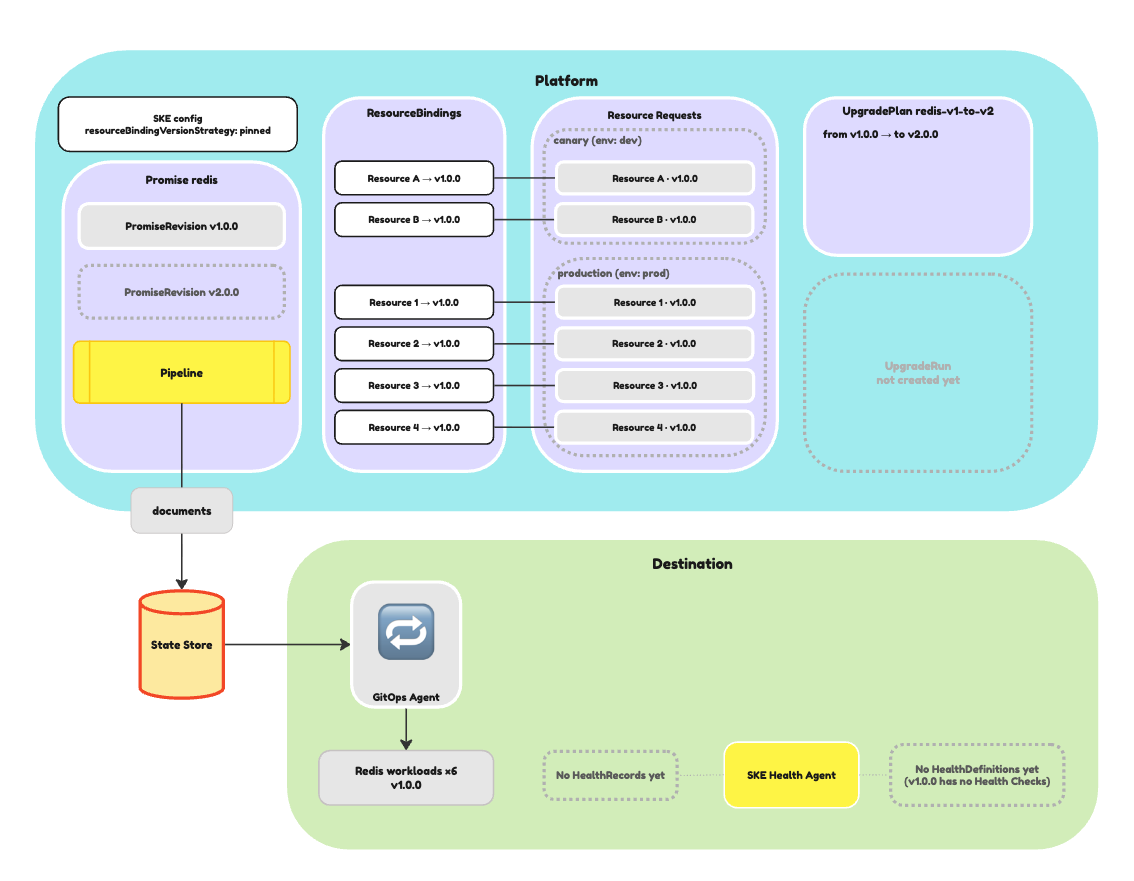
In this example, we have a Redis Promise with two Promise Revisions, v1.0.0 and v2.0.0. All of the Resource Requests are bound to v1.0.0.
To introduce Health Checks to the Promise, we can add a container that writes a
HealthDefinition to the resource.configure workflow of the new version of
the Promise:
apiVersion: platform.kratix.io/v1alpha1
kind: Promise
metadata:
  name: redis
  labels:
    kratix.io/promise-version: v2.0.0
spec:
  workflows:
    resource:
      configure:
        - apiVersion: platform.kratix.io/v1alpha1
          kind: Pipeline
          metadata:
            name: instance-configure
          spec:
            containers:
              - image: ghcr.io/syntasso/kratix-marketplace/redis-configure-pipeline:v0.1.0
                name: redis-configure-pipeline
              - image: ghcr.io/syntasso/kratix-docs/redis-health-checks:v0.1.0
                name: generate-healthdefinition
                command: [ "write-definition" ]
Applying this Promise creates a new PromiseRevision at version v2.0.0. The
pinned resources stay on v1.0.0 until an Upgrade Run moves them.
Defining the Upgrade Plan
To upgrade Resource Requests to this Promise version, we can define an Upgrade Plan that first upgrades a canary group of resources before rolling the upgrade out to production.
In the Upgrade Plan, we set successCriteria: healthCheck on the canary group,
then choose a healthTimeout that's comfortably longer than the gap between
Health Check runs:
apiVersion: platform.syntasso.io/v1alpha1
kind: UpgradePlan
metadata:
  name: redis-v1-to-v2
spec:
  promiseRef:
    name: redis
  upgradePath:
    from:
      - "v1.0.0"
    to: "v2.0.0"
  rolloutGroups:
    - name: canary
      selectors:
        matchLabels:
          env: dev
      maxConcurrent: 1
      successCriteria: healthCheck
      healthTimeout: 15m
    - name: production
      selectors:
        matchLabels:
          env: prod
      maxConcurrent: "25%"
Running the upgrade
We can trigger an upgrade by creating an Upgrade Run:
apiVersion: platform.syntasso.io/v1alpha1
kind: UpgradeRun
metadata:
  name: redis-v1-to-v2-run
spec:
  upgradePlanRef:
    name: redis-v1-to-v2
As it runs, we can look at the run's status to see how it progresses:
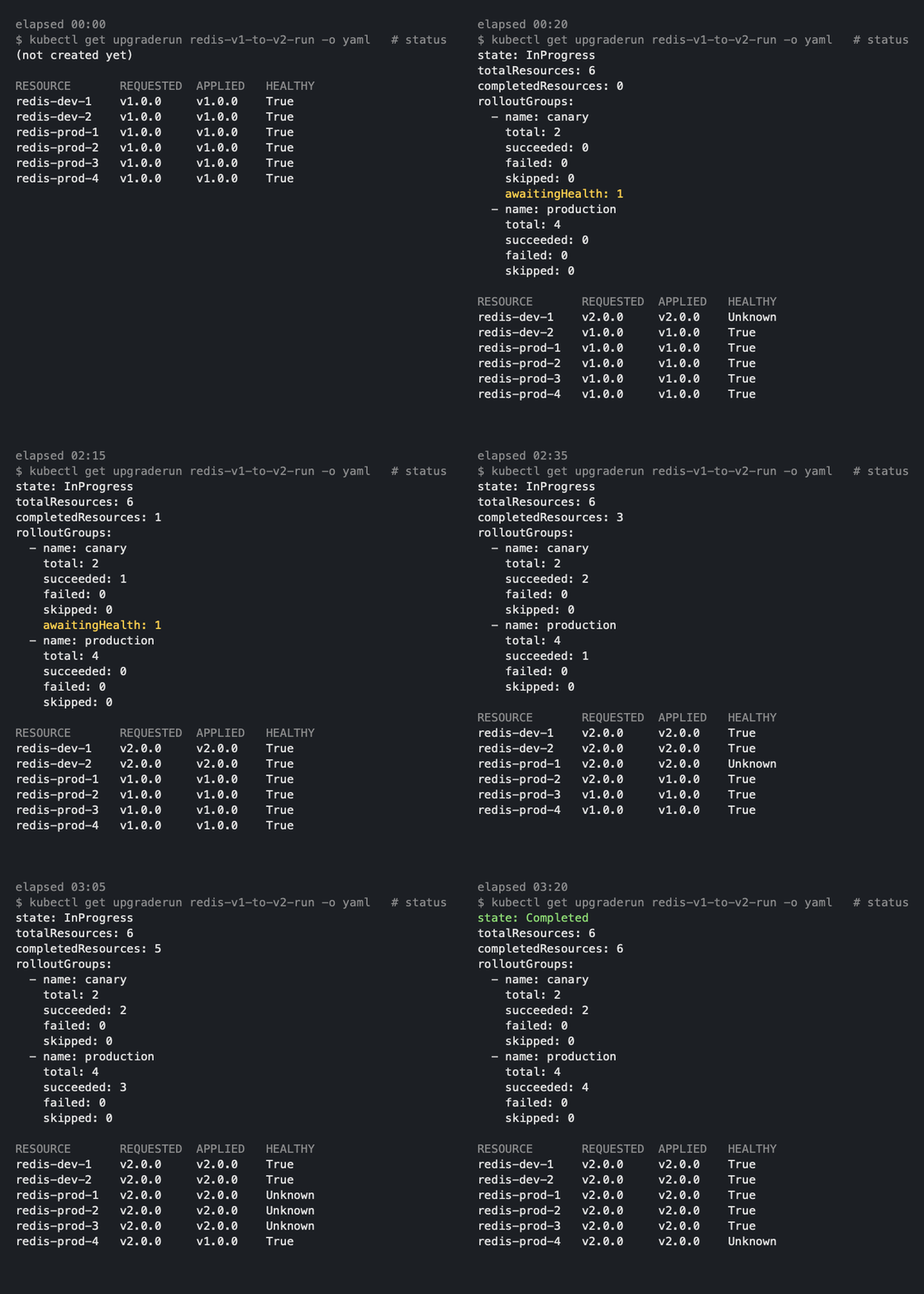
The canary group's awaitingHealth count shows how many resources have reached
v2.0.0 but haven't yet passed their Health Checks. In this example, one canary
resource has passed and one is still waiting. production is yet to start.
Once every canary resource passes, the run moves on to production. When the
run finishes, the state transitions to Completed.
If a canary resource reports unhealthy, or doesn't pass within healthTimeout,
the run stops straight away. The production group is never touched.
With the new health-informed upgrades, you can now be even more confident that your upgrades are safe and that your platform provides a consistent service for your users.
Want to try it out?
You can try health-informed upgrades in the latest version of SKE.
- Take a look at our documentation to see how to write Health Checks for your Promises
- Review our guide to managing Promise upgrades
