Manage Files in Dynamically Registered Git Repositories

Application repositories contain much more than application code. Platform teams often need to manage agent instructions, linter configuration, CI workflows, security policies, dependency rules, or service catalogue metadata.
Making the first commit is the easy part. The real challenge comes later, when the organisation changes its standards. Someone then needs to find every repository, update the right files, correct manual drift, and remove files that are no longer required.
A Kratix Promise can own that complete lifecycle. The user identifies their Git repository and describes what they need. The Promise generates the desired files, and Kratix schedules them to that repository. When the platform team updates the Promise, Kratix rolls the change out to the repositories it manages. It also corrects drift and removes the managed files when their Resource requests are deleted.
The files become managed platform resources, not the forgotten output of a one-off scaffolding task.
Worked example: managing a security baseline
To demonstrate the pattern, we built a SecureRepo Promise. It manages a small
security baseline in a repository, customised from the user's input.
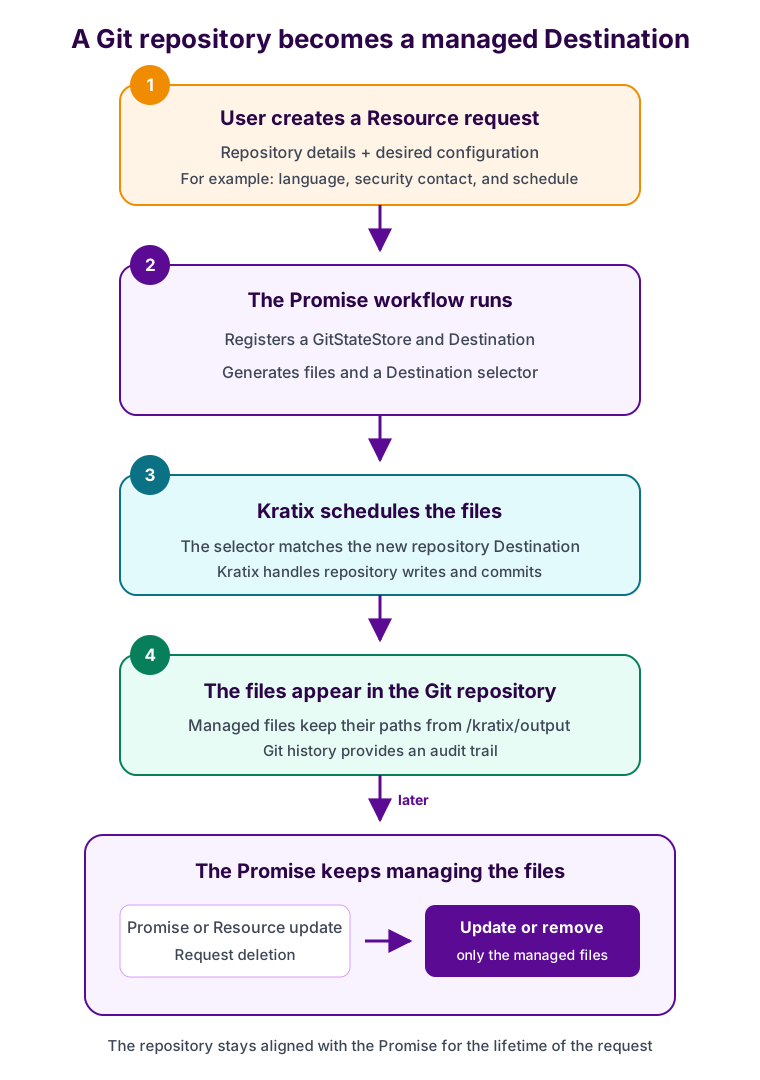
A Promise dynamically registers a Git repository and manages its files over time
The Promise API
The API captures the repository and the inputs used to generate its security configuration:
spec:
  api:
    apiVersion: apiextensions.k8s.io/v1
    kind: CustomResourceDefinition
    metadata:
      name: securerepos.example.kratix.io
    spec:
      group: example.kratix.io
      names:
        kind: SecureRepo
        plural: securerepos
        singular: securerepo
      scope: Namespaced
      versions:
        - name: v1alpha1
          served: true
          storage: true
          schema:
            openAPIV3Schema:
              type: object
              properties:
                spec:
                  type: object
                  properties:
                    repo:
                      type: string
                    language:
                      type: string
                    securityContact:
                      type: string
                    scanSchedule:
                      type: string
                  required:
                    - repo
                    - language
                    - securityContact
The example request onboards repo-alpha:
apiVersion: example.kratix.io/v1alpha1
kind: SecureRepo
metadata:
  name: repo-alpha
  namespace: default
spec:
  repo: repo-alpha
  language: go
  securityContact: security@example.com
  scanSchedule: weekly
This example combines spec.repo with a platform-configured Gitea URL; the API
could accept a complete repository URL instead.
The Promise workflow
The Promise workflow performs five steps:
- Combines the platform-configured Gitea URL with
spec.repo. - Creates a
GitStateStorefor the repository through the Kubernetes API. - Creates a
Destinationthat references theGitStateStoreand labels it with the repository name. - Writes the managed files to
/kratix/output. - Writes a dynamic Destination selector matching the repository label.
The credentials remain a platform concern. The generated GitStateStore
references an existing Secret, so users do not include credentials in their
requests.
This abridged version of the workflow shows the scheduling mechanics. The complete Promise includes the generated file contents and schedule selection.
workflows:
  resource:
    configure:
      - apiVersion: platform.kratix.io/v1alpha1
        kind: Pipeline
        metadata:
          name: configure
        spec:
          rbac:
            permissions:
              - resourceNamespace: "*"
                apiGroups: ["platform.kratix.io"]
                resources: ["gitstatestores", "destinations"]
                verbs: ["get", "create", "update", "patch"]
          containers:
            - name: configure
              image: ghcr.io/syntasso/kratix-pipeline-utility:v0.0.4
              envFrom:
                - secretRef:
                    name: gitea-credentials
              command:
                - python3
                - -c
                - |
                  import subprocess
                  from textwrap import dedent
                  import kratix_sdk as ks

                  sdk = ks.KratixSDK()
                  spec = sdk.read_resource_input()
                  repo = spec.get_value("spec.repo")

                  resources = dedent(f"""
                      apiVersion: platform.kratix.io/v1alpha1
                      kind: GitStateStore
                      metadata:
                        name: secure-{repo}
                      spec:
                        url: <GIT_BASE_URL>/{repo}
                        branch: main
                        secretRef:
                          name: gitea-credentials
                          namespace: default
                      ---
                      apiVersion: platform.kratix.io/v1alpha1
                      kind: Destination
                      metadata:
                        name: secure-{repo}
                        labels:
                          repo: {repo}
                      spec:
                        path: "."
                        filepath: {{ mode: none }}
                        strictMatchLabels: true
                        initWorkloads: {{ enabled: false }}
                        stateStoreRef:
                          name: secure-{repo}
                          kind: GitStateStore
                  """)
                  subprocess.run(
                      ["kubectl", "apply", "-f", "-"],
                      check=True,
                      input=resources.encode(),
                  )

                  # File contents are generated from the Resource request.
                  sdk.write_output("SECURITY.md", security_md.encode())
                  sdk.write_output(
                      ".github/workflows/security.yml",
                      scan_workflow.encode(),
                  )
                  sdk.write_destination_selectors([
                      ks.DestinationSelector(match_labels={"repo": repo})
                  ])
This example uses kubectl apply to keep creation of the GitStateStore and
Destination easy to follow. A stronger long-term approach is to write those
resources to a separate directory under /kratix/output, then use Kratix
destination selectors to schedule them to the Platform Destination. This uses
the same GitOps scheduling mechanism and keeps their lifecycle declarative.
The omitted generation logic writes securityContact into SECURITY.md and
uses scanSchedule to select a daily or weekly cron expression for
.github/workflows/security.yml. The language can select an appropriate
scanner and configuration.
When the workflow finishes, Kratix schedules the output to the new Destination. If that Destination is not ready yet, the Work remains unscheduled until it becomes available. Kratix then commits the files to the repository. The workflow does not need to clone the repository, create commits, or poll for readiness.
Next, we apply the example request to see it in action:
kubectl apply --filename request-repo-alpha.yaml
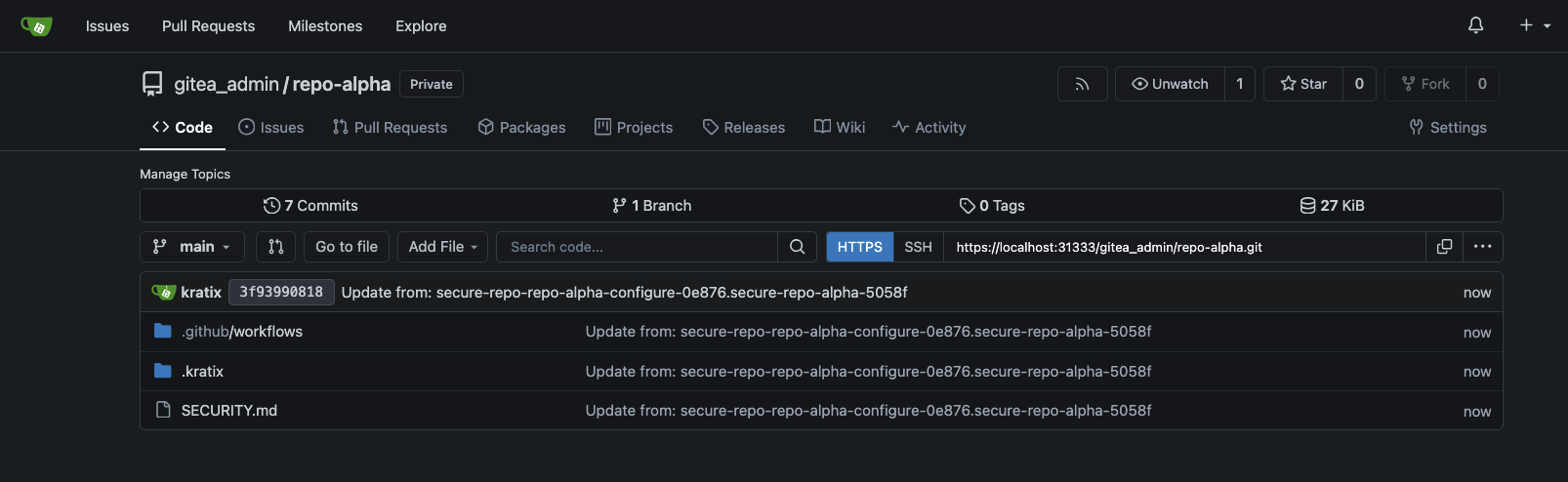
Kratix commits the security baseline to the user-provided repository
The Destination uses filepath.mode: none, so the files retain their paths from
/kratix/output. Kratix also writes a state file under .kratix, recording
which files belong to the WorkPlacement.
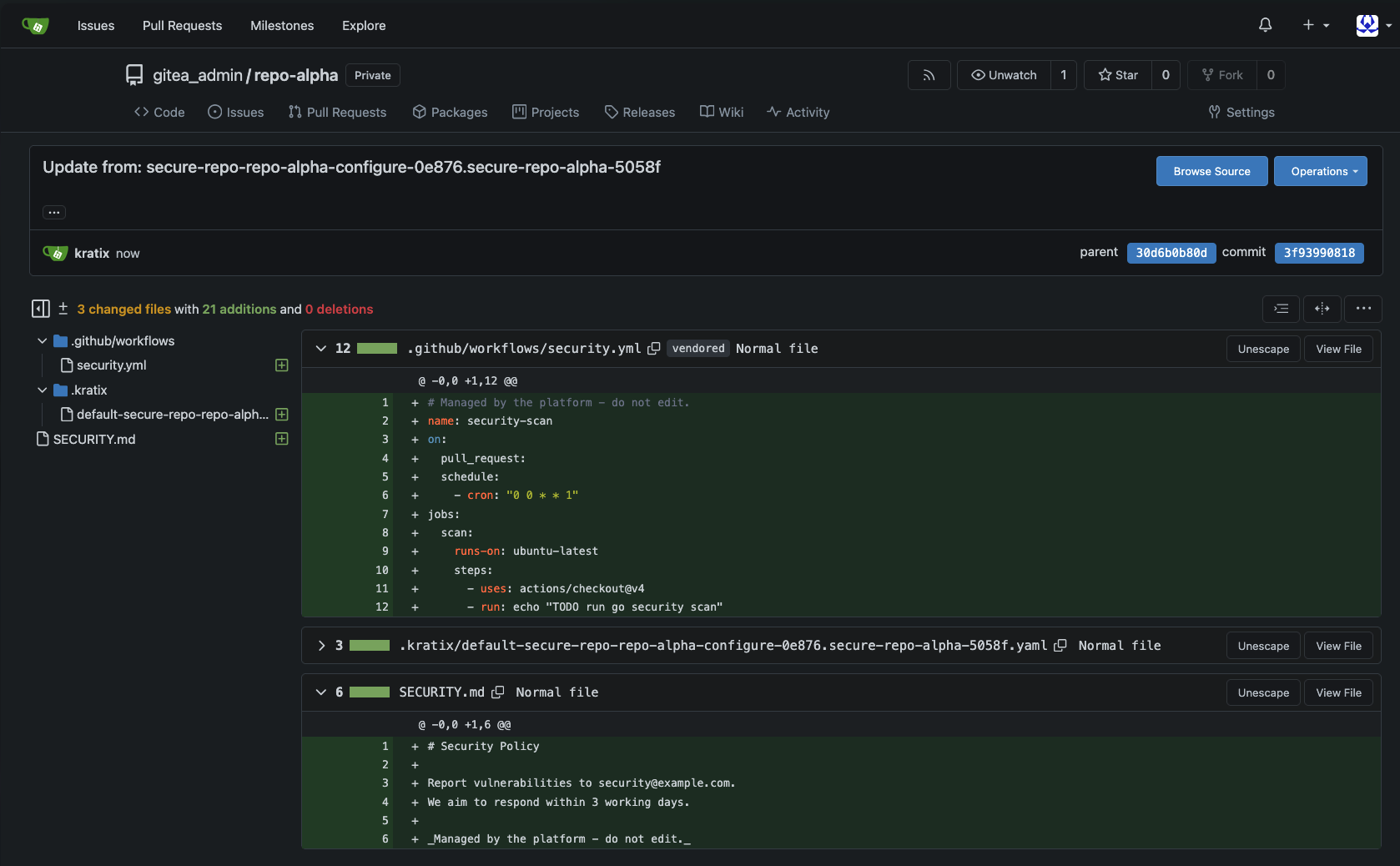
The commit contains the managed files and Kratix ownership metadata
Managed beyond the first commit
The first commit begins the management lifecycle. If the organisation adopts a new scanner or changes its reporting policy, the platform team updates the Promise once. Kratix reruns the workflow for existing requests and rolls the updated files out to their repositories. If a managed file drifts, Kratix restores the desired content.
When the Resource request is deleted, Kratix removes the files associated with its Work. Only the files owned by that request are removed. The rest of the repository remains under the application team's control.
The same pattern works for agent instructions, linters, CI workflows, catalogue metadata, and many other repository files. The Promise defines the desired state, and Kratix looks after it for as long as the request exists.
Want to explore more patterns? Browse the Kratix Guides to learn about workflow controls, waits in Pipelines, Compound Promises, and other ways Kratix can make platform teams' lives easier.
