SKE Frontend Plugin
Overview
@syntasso/plugin-ske-frontend adds Backstage Software Catalog pages for
Kratix Promises and
Kratix Resources.
Annotations on each catalog entity tell the plugin which page to show and how to load current data through the SKE backend plugin.
The pages let Backstage users view available services, create instances, check their status, and update or delete them.
The plugin supports both Backstage frontend systems:
- The New Frontend System discovers the plugin's
alphaentry point and adds the relevant entity content automatically - The legacy frontend system provides entity pages and a matching function
that you add to your app's
EntitySwitch
For setup instructions, see Installing and Configuring the Plugins.
Choosing the entity page
The plugin uses isKratixType('promise') and isKratixType('resource') to
decide whether a catalog entity represents a service definition or a service
instance.
An entity matches when either:
metadata.annotations['kratix.io/type']exactly matchespromiseorresource- the annotation is absent or empty and
spec.typeiskratix-promiseorkratix-resource
If the kratix.io/type annotation has a non-empty value, it takes precedence
over spec.type. An unrecognised non-empty annotation value will therefore
prevent the spec.type fallback from matching. An empty value is treated in
the same way as an absent annotation.
Add kratix.io/type: promise to every Promise entity. Although the route
matcher recognises spec.type: kratix-promise, the page also needs the
annotation when it loads Promise data. Without it, the Promise Overview does
not load. It shows a missing-annotation message for Resource fields instead of
the Promise details.
Resource entities can use either kratix.io/type: resource or
spec.type: kratix-resource.
Entity pages
Promise Overview
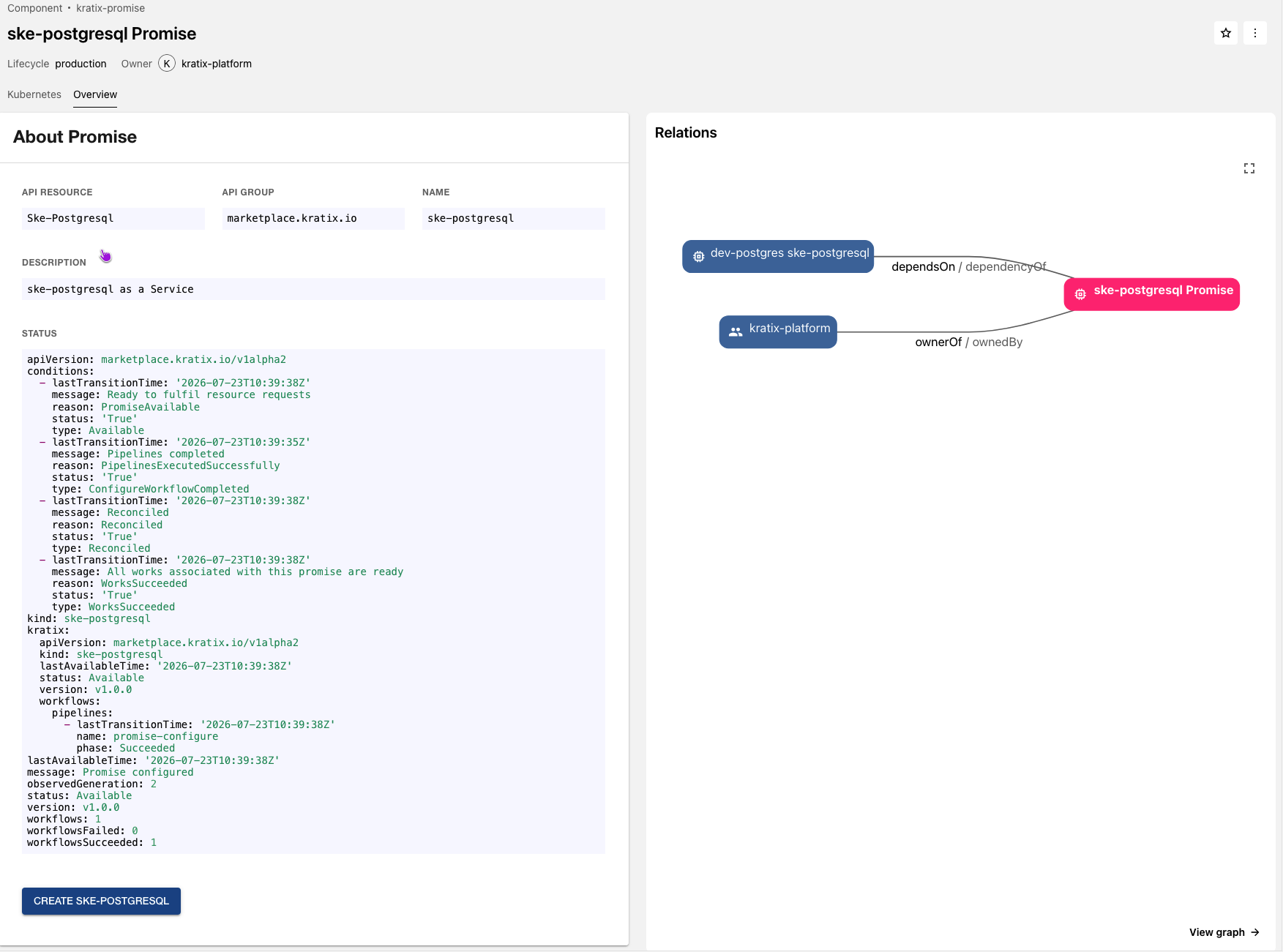
The Promise page contains one Overview tab. It displays:
- the name and API details of the service that users can create
- the catalog entity description
- the Promise status, when available
- a button for creating a service instance from the Promise's Backstage Software Template
- the Backstage Catalog Graph
When kratix.io/backstage-promise-template is present, the create button links
directly to the Software Template in the default namespace. Without the
annotation, the page links to Backstage's filtered Software Template list.
The plugin resolves Software Templates in the default Backstage namespace.
This applies to Promise create actions, Resource updates, and pull-request
deletion workflows.
Example: Database Promise
For a Database Promise, the Overview card could display:
Resource Overview
The Resource Overview tab displays:
- the instance name, namespace, type, and the Promise from which it was created
- the Promise summary, when supplied
- the current status returned by the backend, when available
- the Backstage Catalog Graph
The Promise summary supports Markdown. The graph uses relationships already
present on the Backstage entity, such as spec.dependsOn. The frontend plugin
does not create relationships from the Kubernetes data returned by SKE.
For example, this Resource depends on the Database Promise:
apiVersion: backstage.io/v1alpha1
kind: Component
metadata:
  name: dev
  title: dev-postgres ske-postgresql
spec:
  type: kratix-resource
  lifecycle: production
  owner: group:default/kratix-platform
  dependsOn:
    - component:default/ske-postgresql-promise
And it shows up like this:
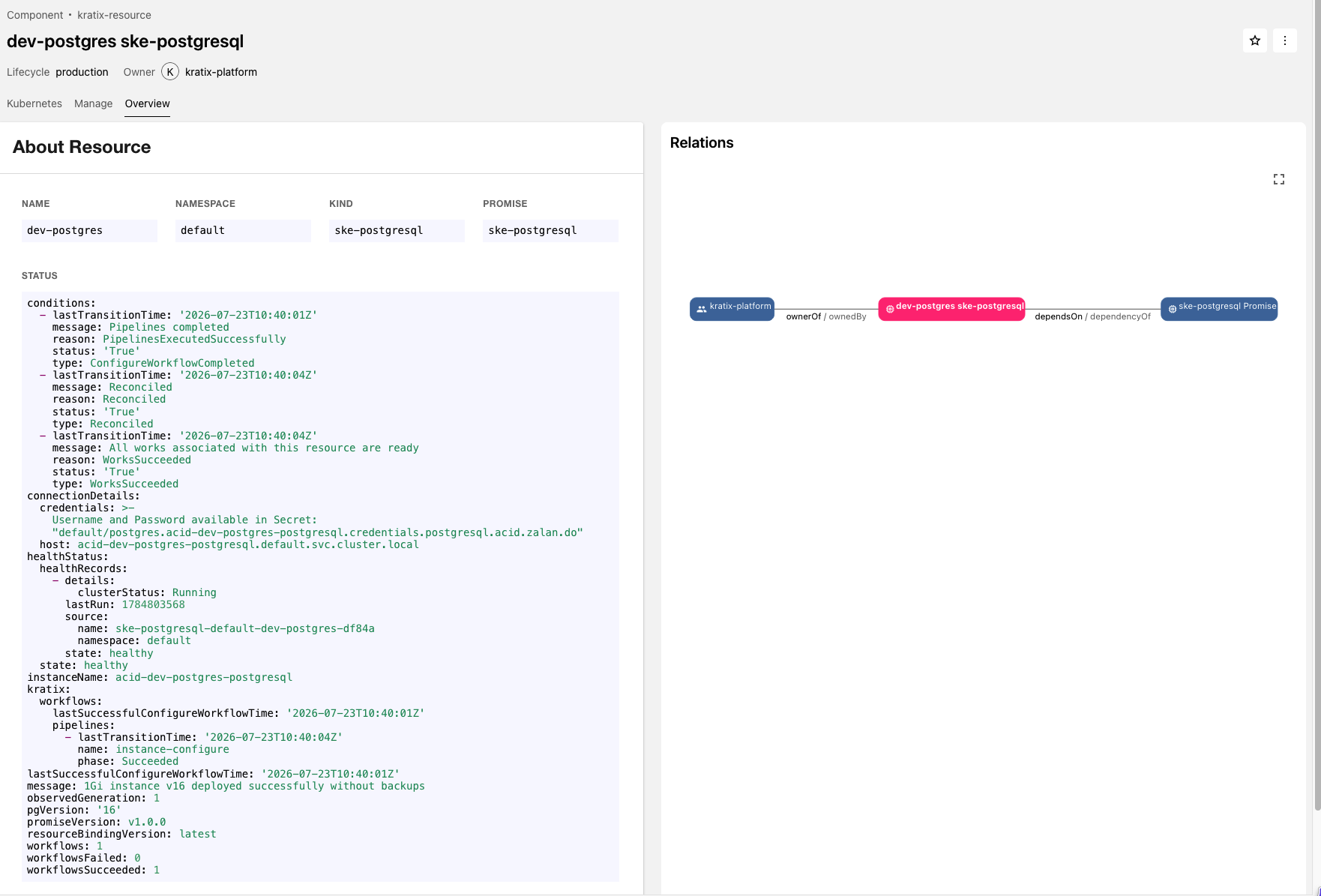
Overview of the dev-postgres Resource and its Promise relationship
Resource Manage
The Resource Manage tab loads the current instance data before presenting update and delete controls.
Without kratix.io/backstage-promise-template, the update area shows a missing
annotation message. Direct deletion remains available.
Update a Resource
The update form embeds the Backstage Software Template named by
kratix.io/backstage-promise-template. It starts with these values from the
current Resource data:
| Field | Meaning |
|---|---|
objname | Resource metadata.name. Read-only. |
objnamespace | Resource metadata.namespace. Read-only. |
spec | Editable Resource spec. |
repoUrl | Request repository. Disabled when supplied. |
Example: updating a PostgreSQL Resource
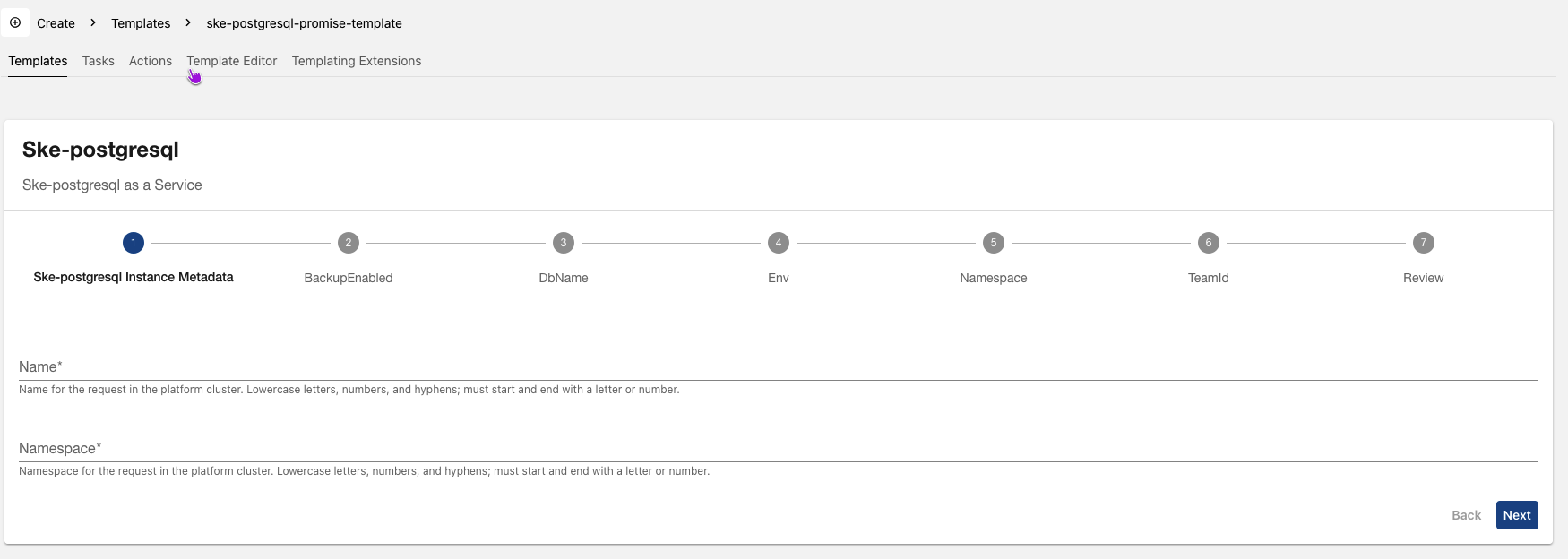
Submitting the form starts a Backstage scaffolder task and opens the task page.
The plugin always runs the referenced Software Template and does not check whether it can safely update an existing instance. The template must support existing instances as well as new ones.
The embedded form registers Backstage's standard entity, owner, repository,
and branch picker field extensions. The Secret field extension is not
supported because Backstage does not export it as a field-extension component.
Delete a Resource
The delete behaviour depends on the entity annotations.
Pull-request deletion
When both kratix.io/requests-repo-url and
kratix.io/backstage-promise-template are present, the plugin runs the same
Software Template with prAction: Delete and
catalogPhase: pending-deletion. It then opens the scaffolder task page. The
Software Template is expected to open a pull request that removes the
Resource's YAML configuration file.
The instance remains available until the pull request is merged and the platform processes the removal of its configuration file.
Immediate deletion
When either annotation is absent, the plugin calls
POST /api/ske/delete-resource on the SKE backend plugin to request deletion
immediately.
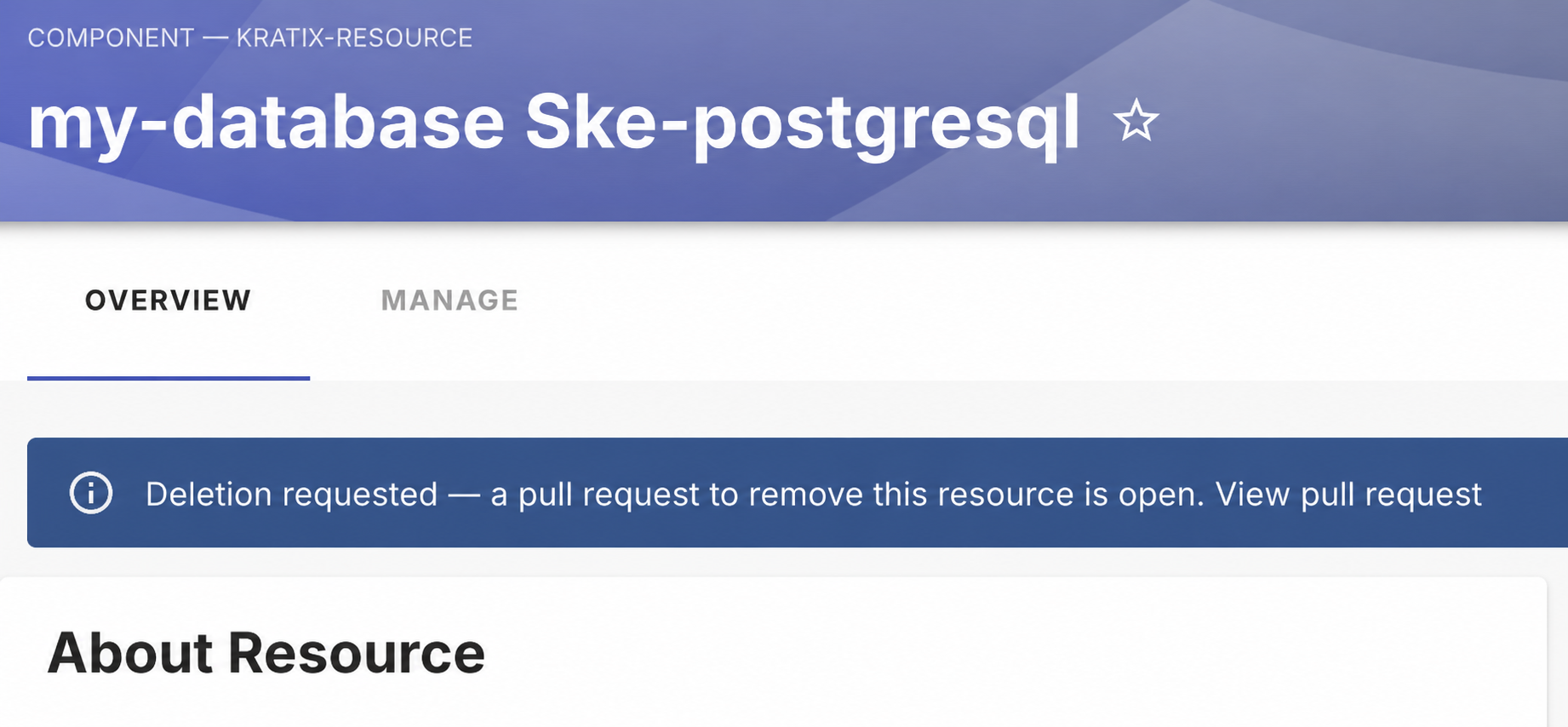
Example: deleting a PostgreSQL Resource through a pull request
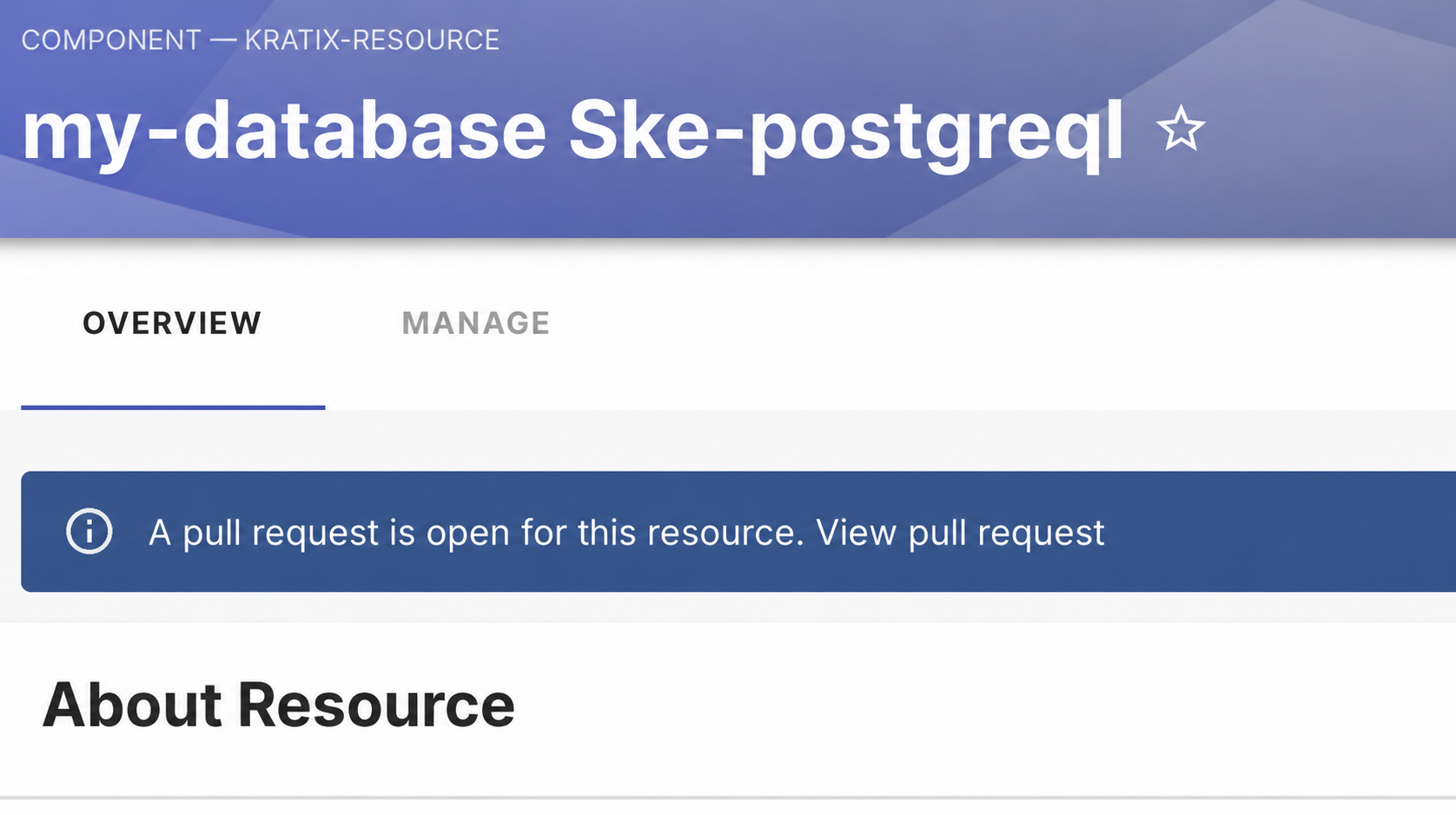
For a Resource configured for pull-request deletion, the plugin will show when there is a pull-request for deletion:
Entity annotations
Annotations are the configuration contract between a Backstage catalog entity and the frontend plugin. The snippets below show only the annotations read by the plugin. See YAML File Format for complete entity examples.
Promise annotations
Promise annotations tell the plugin which Promise to load and what to display on its Overview card. They can also link the create action to a Software Template. The following example describes a Database Promise:
metadata:
  annotations:
    kratix.io/type: promise
    kratix.io/promise-name: database
    kratix.io/api-name: Database
    kratix.io/api-group: marketplace.kratix.io
    kratix.io/status: '{"message":"Available"}'
    kratix.io/backstage-promise-template: database-promise-template
In this example, database-promise-template matches the Software Template's
metadata.name:
apiVersion: scaffolder.backstage.io/v1beta3
kind: Template
metadata:
  name: database-promise-template
  namespace: default
The Software Template's parameters and steps are omitted because they do not affect how the plugin finds the entity.
| Annotation | Required | Meaning |
|---|---|---|
kratix.io/type | Yes | Selects Promise rendering and data loading. |
kratix.io/promise-name | Yes | Promise name used by the backend. |
kratix.io/api-name | No | Service type and create-button label. |
kratix.io/api-group | No | Service API group. |
kratix.io/status | No | Fallback status as JSON. |
kratix.io/backstage-promise-template | No | Software Template name. |
kratix.io/api-name and kratix.io/api-group default to n/a. The plugin
displays kratix.io/status as YAML. It resolves the Software Template in the
default namespace.
kratix.io/status must contain valid JSONThis requirement applies only to kratix.io/status. When used as a fallback,
the annotation is parsed as JSON before the plugin displays it as YAML. An
invalid value prevents the details card from rendering.
Resource annotations
Resource annotations tell the plugin which Kubernetes Resource backs the catalog entity and what to display on its Overview tab. They can also link the Manage tab to a Software Template for updates. The following table shows the list of annotations we can have:
| Annotation | Required | Meaning |
|---|---|---|
kratix.io/type | No | Selects Resource rendering. |
kratix.io/group | Yes | API group used to find the Resource. |
kratix.io/version | Yes | API version used to find the Resource. |
kratix.io/kind | Yes | Kind used to find the Resource. |
kratix.io/name | Yes | Resource name. |
kratix.io/namespace | Yes | Resource namespace. |
kratix.io/promise-name | No | Promise name displayed by the plugin. |
kratix.io/status | No | Fallback status as JSON. |
kratix.io/promise-summary | No | Markdown summary for Overview. |
kratix.io/backstage-promise-template | For updates | Template name. |
When kratix.io/type is absent, use spec.type: kratix-resource. Status
returned by the backend takes precedence over kratix.io/status. The Software
Template is resolved in the default namespace.
The current hook detects missing kratix.io/kind, kratix.io/name, and
kratix.io/namespace values before it calls the backend. It does not detect a
missing kratix.io/group or kratix.io/version; instead, it sends an invalid
API version containing undefined. Always supply all five annotations.
The following example describes a PostgreSQL Resource named prod-db:
metadata:
  annotations:
    kratix.io/type: resource
    kratix.io/promise-name: database
    kratix.io/group: marketplace.kratix.io
    kratix.io/version: v1alpha1
    kratix.io/kind: database
    kratix.io/name: prod-db
    kratix.io/namespace: team-backend
    kratix.io/status: >-
      {"instanceName":"prod-db-postgresql","pgVersion":"14.17"}
    kratix.io/backstage-promise-template: database-promise-template
    kratix.io/promise-summary: PostgreSQL with automated backups
Pull-request workflow annotations
These optional Resource annotations support Software Template workflows that propose Resource changes through pull requests, described in the following table:
| Annotation | Meaning |
|---|---|
kratix.io/requests-repo-url | Resource configuration repository. |
kratix.io/phase | Pull-request workflow state. |
kratix.io/pull-request-url | Pull-request link. |
Here's an example of an resource annotated for pull-request updates:
metadata:
  annotations:
    kratix.io/requests-repo-url: >-
      github.com?owner=example-org&repo=platform-requests
    kratix.io/phase: pending-review
    kratix.io/pull-request-url: >-
      https://github.com/example-org/platform-requests/pull/42
The Manage tab pre-fills kratix.io/requests-repo-url, prevents it from being
changed, and uses it to select pull-request deletion. The value uses
Backstage's RepoUrlPicker format:
<HOST>?owner=<OWNER>&repo=<REPOSITORY>.
Set kratix.io/phase to pending-review and provide
kratix.io/pull-request-url to show an open pull-request banner. The
pending-review banner is not shown without the URL.
Set kratix.io/phase to pending-deletion to show a deletion-requested
banner. This banner does not require kratix.io/pull-request-url, but includes
a View pull request link when the URL is present.
Loading data and displaying status
The frontend plugin discovers the backend with the ske plugin ID and calls
the backend plugin endpoints.
For a Promise, it sends the following identifiers to the backend:
apiVersion=platform.kratix.io/v1alpha1
kind=Promise
name=<kratix.io/promise-name>
For a Resource, it builds the backend request from kratix.io/group,
kratix.io/version, kratix.io/kind, kratix.io/name, and
kratix.io/namespace. Together, these values identify one service instance on
the platform.
The response affects the page as follows:
200withoutmetadata.deletionTimestamp: stores and displays the returned manifest and status200withmetadata.deletionTimestamp: puts the page into the deleting state without storing the returned manifest. The Overview falls back to catalog entity annotations, and Resource management controls are unavailable404for a Resource: treats the Resource as being deleted or already removed404for a Promise: leaves the page available without current backend data, supporting GitOps mode where the repository may not contain Promise definitions- Any other response with a JSON body: displays an error banner and includes
the response
messagewhen present
The hook does not catch discovery failures, rejected fetches, or responses that
cannot be parsed as JSON. Those failures do not move the hook to
Stage.ERROR.
When the backend cannot find a Promise definition in its configured
repository, Promise status can only come from kratix.io/status on the catalog
entity.
For Resource entities, pull-request banners use catalog entity annotations rather than the data returned by the backend. This allows the page to show a pending deletion while the instance still exists and waits for a pull request to merge. A pending-deletion banner takes precedence over fetch errors and pending-review banners.
Hooks
useKratixResourceFetcher
useKratixResourceFetcher loads the Promise or Resource associated with the
current catalog entity. It also manages loading and deletion state, checks for
required annotations, and creates the status banners used by the plugin's
Overview and Manage tabs.
Use this hook when building custom catalog entity content that needs the same data and state as the plugin's supplied components.
The component calling the hook must be rendered within a Backstage catalog
entity context. The hook uses useEntity to read the current entity and uses
Backstage's discovery and fetch APIs to call the ske backend plugin.
The hook uses the following Types:
| Type | Kind | Purpose |
|---|---|---|
ResourceType | Union | Identifies whether the hook loads a Promise or Resource |
UseKratixResourceFetcherOptions | Interface | Configures the hook |
KratixResourceResult | Interface | Describes the hook's return value |
Stage | Enum | Represents the current fetch or deletion stage |
EntityIdentifier | Object Type | Identifies a Resource and its update workflow |
ResourceType
ResourceType identifies which platform object the hook loads:
type ResourceType = 'resource' | 'promise';
| Value | Meaning |
|---|---|
resource | Load a Kratix Resource instance |
promise | Load a Kratix Promise |
UseKratixResourceFetcherOptions
UseKratixResourceFetcherOptions is the optional object passed to the hook:
interface UseKratixResourceFetcherOptions {
  resourceType?: ResourceType;
}
| Field | Required | Default | Meaning |
|---|---|---|---|
resourceType | No | Detected | Overrides the entity type to load |
When resourceType is omitted, the hook reads kratix.io/type. The value
promise selects Promise loading. Any other value, including an absent
annotation, selects Resource loading. Unlike isKratixType, the hook does not
use spec.type as a fallback.
Promise loading requires kratix.io/promise-name. When it is absent, the hook
does not call the backend but remains in Stage.FETCHING; the supplied
Overview and Manage tabs therefore continue to show their loading state.
A valid Resource request requires kratix.io/group, kratix.io/version,
kratix.io/kind, kratix.io/name, and kratix.io/namespace. The hook
currently flags only a missing kind, name, or namespace through
missingKratixAnnotations. See Entity annotations for
the complete configuration.
KratixResourceResult
KratixResourceResult describes the object returned by the hook:
interface KratixResourceResult {
  resource: any;
  bannerMessage: string;
  showBanner: boolean;
  banner: JSX.Element;
  resourceType: ResourceType;
  currentStage: Stage;
  setStage: (stage: Stage) => void;
  missingKratixAnnotations: boolean;
  showDeletionBanner: boolean;
  entityIdentifier: EntityIdentifier | undefined;
}
| Field | Type | Meaning |
|---|---|---|
resource | any | Manifest returned by the backend; null until a manifest is loaded |
bannerMessage | string | Error or deletion message; an empty string when no message is set |
showBanner | boolean | Whether to render banner |
banner | JSX.Element | Grid element containing the current status banner, when one applies |
resourceType | ResourceType | Type selected by the override or entity annotation |
currentStage | Stage | Current fetch or deletion stage |
setStage | (stage: Stage) => void | Updates currentStage; the DELETING stage also sets the deletion message |
missingKratixAnnotations | boolean | Whether the Promise name, or the Resource kind, name, or namespace, is absent. Missing Resource group and version annotations are not detected |
showDeletionBanner | boolean | Backwards-compatible alias of showBanner |
entityIdentifier | EntityIdentifier | undefined | Resource identifiers and update-workflow configuration; undefined for a Promise |
The hook does not populate entityIdentifier when resourceType is promise.
Only access this field for a Resource.
When annotations represented by missingKratixAnnotations are absent, the
hook does not call the backend. Check missingKratixAnnotations before
rendering data. Backend responses and banner precedence follow the behaviour
described in
Loading data and displaying status.
Stage
Stage represents the hook's current request or deletion state:
enum Stage {
  FETCHING = 'fetching',
  DELETING = 'deleting',
  READY = 'ready',
  ERROR = 'error',
}
| Member | Value | Meaning |
|---|---|---|
Stage.FETCHING | fetching | The hook is waiting for the backend response |
Stage.DELETING | deleting | The Resource has a deletion timestamp, was not found, or deletion was requested |
Stage.READY | ready | Loading completed without an error |
Stage.ERROR | error | A JSON response reports an error, or the Resource kind, name, or namespace is absent |
The initial stage is Stage.FETCHING. A 404 response moves a Resource to
Stage.DELETING, but moves a Promise to Stage.READY to support GitOps mode.
A Promise without kratix.io/promise-name remains in Stage.FETCHING.
EntityIdentifier
EntityIdentifier contains the identifiers and optional workflow configuration
that the Manage tab needs for a Resource:
type EntityIdentifier = {
  kind: string;
  namespace: string | undefined;
  name: string;
  apiVersion: string;
  templateName: string | undefined;
  requestsRepoUrl?: string;
};
| Field | Type | Meaning |
|---|---|---|
kind | string | Value of kratix.io/kind |
namespace | string | undefined | Value of kratix.io/namespace |
name | string | Value of kratix.io/name |
apiVersion | string | <kratix.io/group>/<kratix.io/version> |
templateName | string | undefined | Value of kratix.io/backstage-promise-template |
requestsRepoUrl | string | undefined | Value of kratix.io/requests-repo-url in Backstage RepoUrlPicker format |
Example
This custom component displays the status returned for the current Resource. It assumes the component is rendered on a catalog entity page:
import {
  useKratixResourceFetcher,
} from '@syntasso/plugin-ske-frontend';

export const ResourceStatus = () => {
  const {
    banner,
    missingKratixAnnotations,
    resource,
    showBanner,
  } = useKratixResourceFetcher({ resourceType: 'resource' });

  if (missingKratixAnnotations) {
    return <p>This catalog entity is missing its Resource annotations.</p>;
  }

  return (
    <>
      {showBanner && banner}
      <pre>{JSON.stringify(resource?.status ?? {}, null, 2)}</pre>
    </>
  );
};
Components
The package exports React components for complete entity pages, individual tabs, and lower-level content. Use these exports as JSX rather than calling them as functions.
The examples below focus on each component. Imports and surrounding Backstage app setup are omitted.
KratixPromiseEntityPage
It provides a complete EntityLayout for a Promise, and requires content, which
it adds to the Overview tab alongside the plugin content.
<KratixPromiseEntityPage>
  {entityWarningContent}
</KratixPromiseEntityPage>
KratixResourceEntityPage
It provides a complete EntityLayout for a Resource, requires content for the
Overview tab, and adds the Manage tab.
<KratixResourceEntityPage>
  {entityWarningContent}
</KratixResourceEntityPage>
KratixOverviewTab
It provides the Overview tab content for a Promise or Resource. It accepts
optional content and a resourceType override; otherwise, it infers the type
from the catalog entity.
<KratixOverviewTab resourceType="resource">
  {entityWarningContent}
</KratixOverviewTab>
KratixManageTab
It provides the Manage tab content and accepts an optional resourceType
override. Otherwise, it infers the type from the catalog entity. Resources
include update and delete controls; Promises show a placeholder.
<KratixManageTab resourceType="resource" />
KratixAboutCard
It provides the details card for the Overview tab. It requires a Promise or
Resource from the SKE backend and accepts an optional entityType override.
<KratixAboutCard entity={resource} entityType="resource" />
KratixResourceManageContent
It provides the lower-level update and delete content used by
KratixManageTab. It requires the Resource identifier, loading stage, stage
setter, and current Resource data. Most applications should use
KratixManageTab, which supplies those values.
<KratixResourceManageContent
  entityIdentifier={entityIdentifier}
  entityState={currentStage}
  kratixResource={resource}
  setCurrentStage={setCurrentStage}
/>
Scaffolder field extensions
The package also exports custom field
extensions
for use on Template forms, selected with ui:field on a property.
ScopedEntityPicker
ScopedEntityPicker is an extension of Backstage's
EntityPicker
whose catalogFilter may reference other fields of the same form, so one choice
narrows the next.
In this example the System field is an ordinary EntityPicker, and the Service
field offers only the services within the System that was picked:
- title: Specification
  properties:
    spec:
      properties:
        system:
          type: string
          title: System
          ui:field: EntityPicker
          ui:options:
            catalogFilter:
              kind: System
        targetService:
          type: string
          title: Service
          ui:field: ScopedEntityPicker
          ui:options:
            catalogFilter:
              kind: Component
              relations.partOf: '{{ parameters.spec.system }}'
ScopedEntityPicker accepts every ui:options keys the EntityPicker does, such as
defaultKind, defaultNamespace and allowArbitraryValues, and passes them
through unchanged. Only catalogFilter is treated specially.
Resolving the filter
Any string in catalogFilter, at any depth and inside lists, may contain
{{ parameters.<path> }}. The path is read from the form data accumulated
across every step so far, so a reference may point at a field on an earlier
page or on the same one.
Resolution is all-or-nothing: if any reference in the filter resolves to nothing, the field renders as a disabled input, still showing any value it holds.
A catalogFilter with no references in it behaves exactly like EntityPicker.
Behaviour when the referenced field changes
- The picker re-queries the catalogue whenever the resolved filter changes, and offers the new scope's entities.
- A selection already made is kept if it is in the new scope, and cleared
if the catalogue read for the new scope comes back without it. Values are
compared as entity references, honouring
defaultKindanddefaultNamespaceand ignoring case, sopayments-apiandcomponent:default/payments-apiare the same selection.
The field behaves the same way on the create form and on the Manage tab.
Choosing a filter key
Any entity field or relation can be a filter key. Where a key holds a list, matching means "contains". Keys and values are matched case-insensitively.
Besides keys over the spec, you can also use relations.partOf. The common relations on a Component are:
spec field | Relation |
|---|---|
spec.owner | relations.ownedBy |
spec.system | relations.partOf |
spec.subcomponentOf | relations.partOf |
spec.dependsOn | relations.dependsOn |
spec.providesApis | relations.providesApi |
spec.consumesApis | relations.consumesApi |
See well-known relations for the full list.
Registering the field
Applications on Backstage's new frontend system need no wiring: the
/alpha entry point registers the field,
and the Manage tab already includes it.
On the legacy frontend system, register it in your app's scaffolder route alongside any other custom fields:
import { ScopedEntityPickerFieldExtension } from '@syntasso/plugin-ske-frontend';
import { ScaffolderFieldExtensions } from '@backstage/plugin-scaffolder-react';

<Route path="/create" element={<ScaffolderPage />}>
  <ScaffolderFieldExtensions>
    <ScopedEntityPickerFieldExtension />
  </ScaffolderFieldExtensions>
</Route>;
Plugin integration
The package also exports values for integrating the plugin with Backstage's frontend systems.
skeFrontendPlugin
skeFrontendPlugin is the plugin object created with Backstage's
createPlugin. It owns the ske-frontend plugin ID and root route used by the
legacy frontend system.
isKratixType
isKratixType is a utility function used to identify Kratix entities by type.
Calling isKratixType('promise') or isKratixType('resource') will inform
whether the entity matches the specified type. Use this function with
EntitySwitch.Case to select the appropriate entity page.
<EntitySwitch.Case if={isKratixType('promise')}>
  {promisePage}
</EntitySwitch.Case>
New Frontend System entry point
The @syntasso/plugin-ske-frontend/alpha entry point registers Kratix routes
on Backstage Software Catalog entity pages. When Backstage loads the plugin,
users can open Kratix Promises and Resources through the same entity-page
navigation as other catalog entities. You do not need to add these routes to an
EntitySwitch manually.
The plugin checks the entity type and adds the relevant configuration:
| Entity | Route | Content |
|---|---|---|
| Promise | / | Overview tab |
| Resource | / | Overview tab |
| Resource | /manage | Manage tab with update and delete controls |
These paths are relative to the catalog entity page, rather than top-level Backstage routes. Other catalog entity types are unaffected.
