Customising the request template
The Portal Controller turns a Promise's API into a Backstage Template—the request template a
developer fills in to ask for a resource. Most of what you want that template to do, you write
into the CRD in spec.api.
Where the API cannot express it, bind the Promise to a
PortalCustomization and patch the request template after the Portal
Controller's generator has built it.
The examples on this page are fragments of one postgresql Promise. Each one is a property of
spec, which is the block highlighted below:
apiVersion: platform.kratix.io/v1alpha1
kind: Promise
metadata:
  name: postgresql
spec:
  api:
    apiVersion: apiextensions.k8s.io/v1
    kind: CustomResourceDefinition
    metadata:
      name: postgresqls.marketplace.kratix.io
    spec:
      group: marketplace.kratix.io
      names:
        kind: postgresql
        plural: postgresqls
        singular: postgresql
      scope: Namespaced
      versions:
        - name: v1alpha1
          served: true
          storage: true
          schema:
            openAPIV3Schema:
              type: object
              properties:
                spec:
                  type: object
                  properties:
                    size:
                      type: string
                      title: Instance size
                    # every example on this page goes here
Behaviour that comes from your API
Everything in this section is a change to the Promise itself. No PortalCustomization is
involved: the generator reads these keywords from the CRD and the request template carries them
through to Backstage.
Required fields
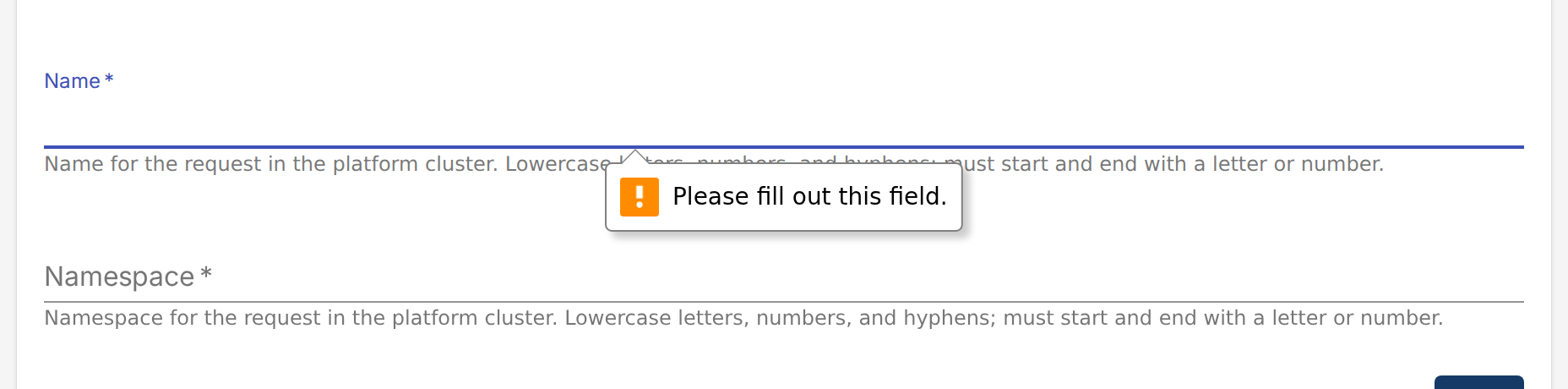
List the property in required on the object that holds it. Backstage marks it with an asterisk
and will not move on to the next page until it has a value.
spec:
  type: object
  required:
    - size
  properties:
    size:
      type: string
Dropdowns and defaults
enum gives the developer a dropdown, and default preselects one of the values.
size:
  type: string
  title: Instance size
  description: How much CPU and memory the database gets.
  enum: [small, medium, large]
  default: small

enum values, with the default highlightedtitle is the field label and description is the helper text underneath it. Set a title on
nested properties too, so they get a label of their own.
Immutable fields
Freeze a field with a CEL validation rule on the CRD:
region:
  type: string
  title: Region
  description: Region the database is created in.
  enum: [eu-west-1, us-east-1]
  x-kubernetes-validations:
    - rule: self == oldSelf
      message: region is immutable
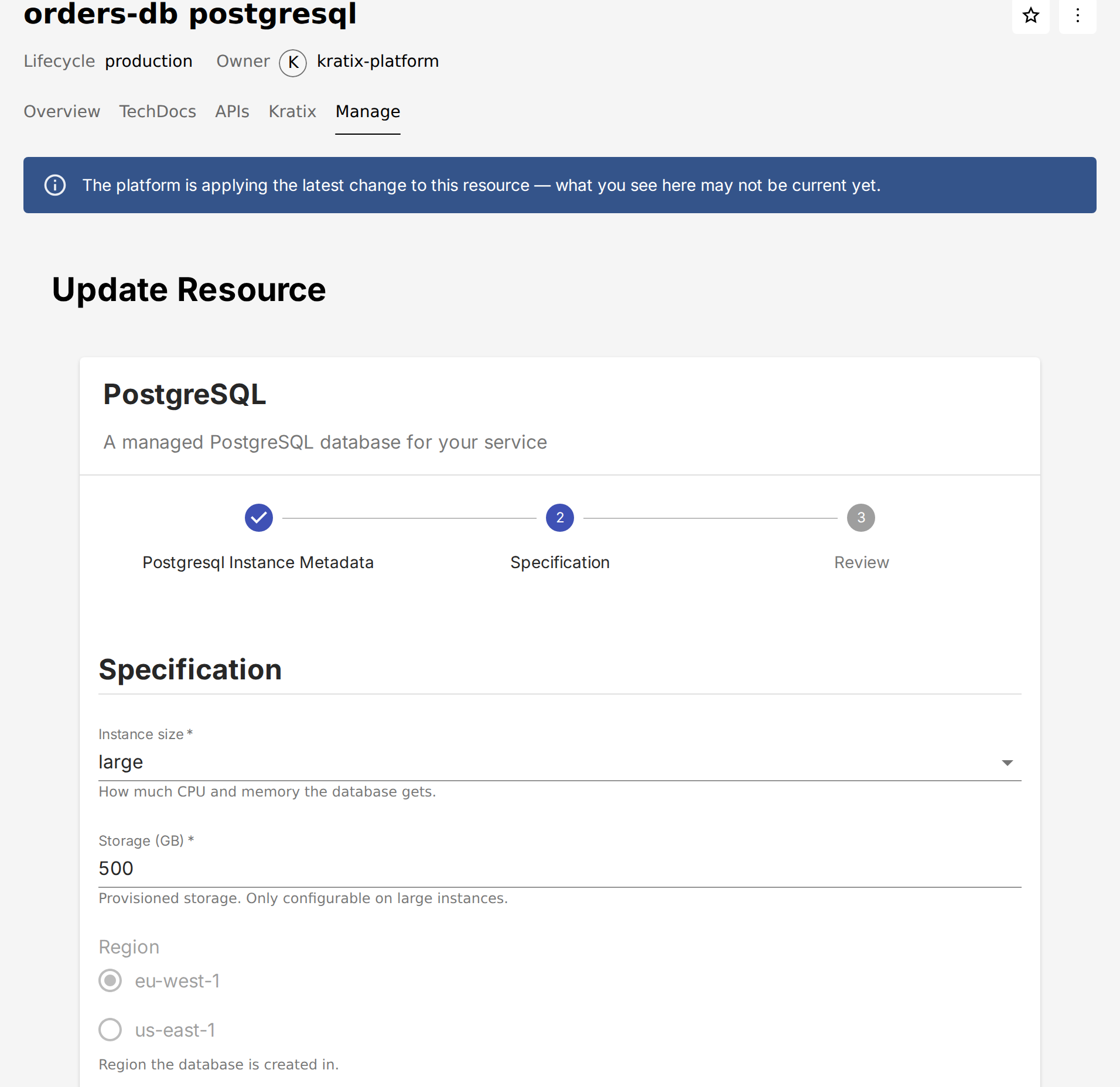
The API server now rejects any update that changes region, and the generator marks the property
so the SKE frontend renders it read-only on the
Manage tab. It stays editable on the create form, where
there is nothing yet to preserve.
Mutually exclusive options
oneOf lets a developer configure one of several things rather than all of them. Each option
lists the properties it needs, and Backstage renders a radio button per option, showing only the
fields that belong to the option selected.
backups:
  type: object
  title: Backups
  description: Where backups are shipped.
  oneOf:
    - required: [s3]
    - required: [gcs]
  properties:
    expireAfterDays:
      type: integer
      title: Expire after (days)
      default: 30
    s3:
      type: object
      title: Amazon S3
      properties:
        bucket:
          type: string
          title: Bucket
        roleArn:
          type: string
          title: Role ARN
    gcs:
      type: object
      title: Google Cloud Storage
      properties:
        bucket:
          type: string
          title: Bucket
        serviceAccount:
          type: string
          title: Service account
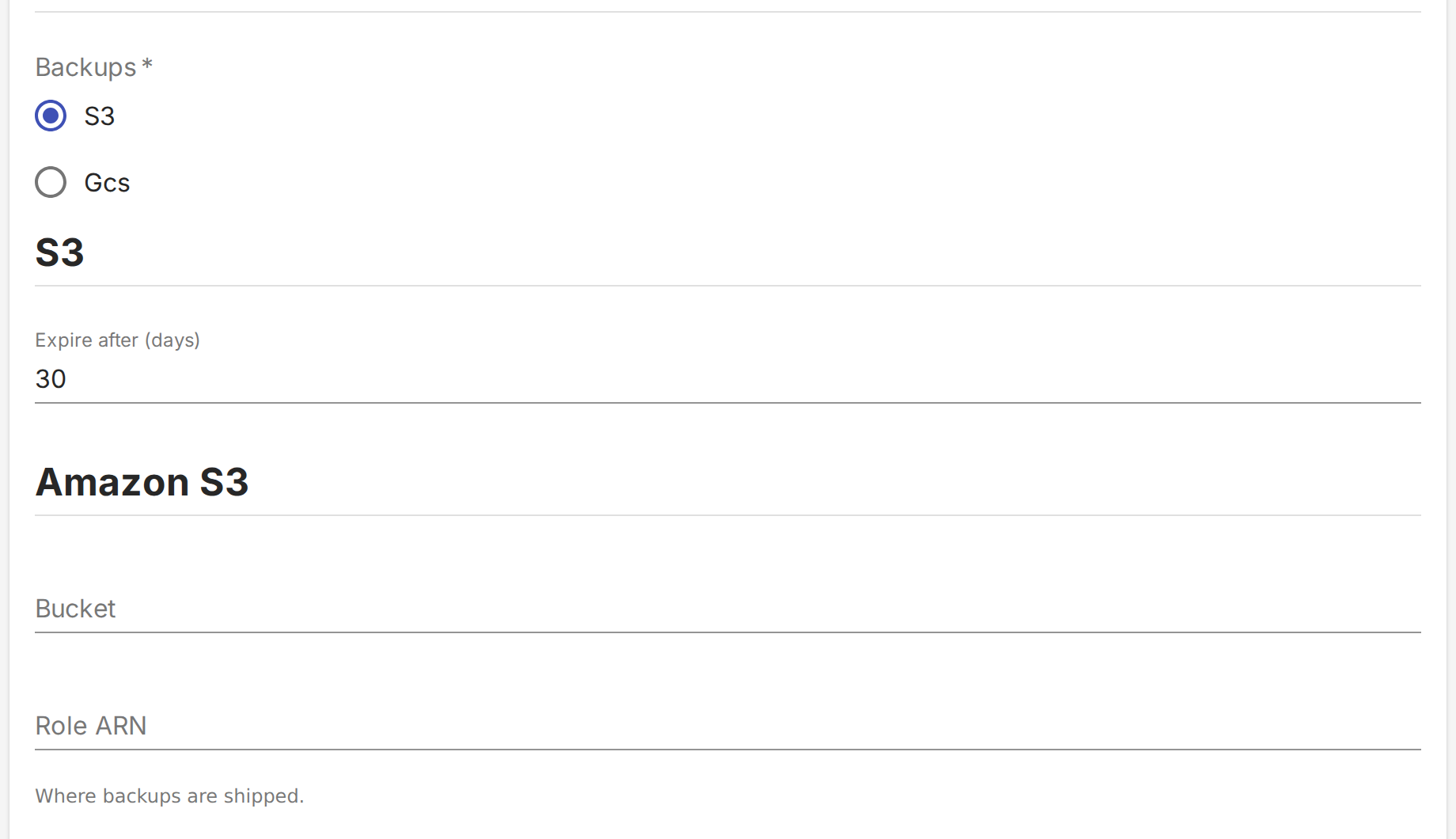
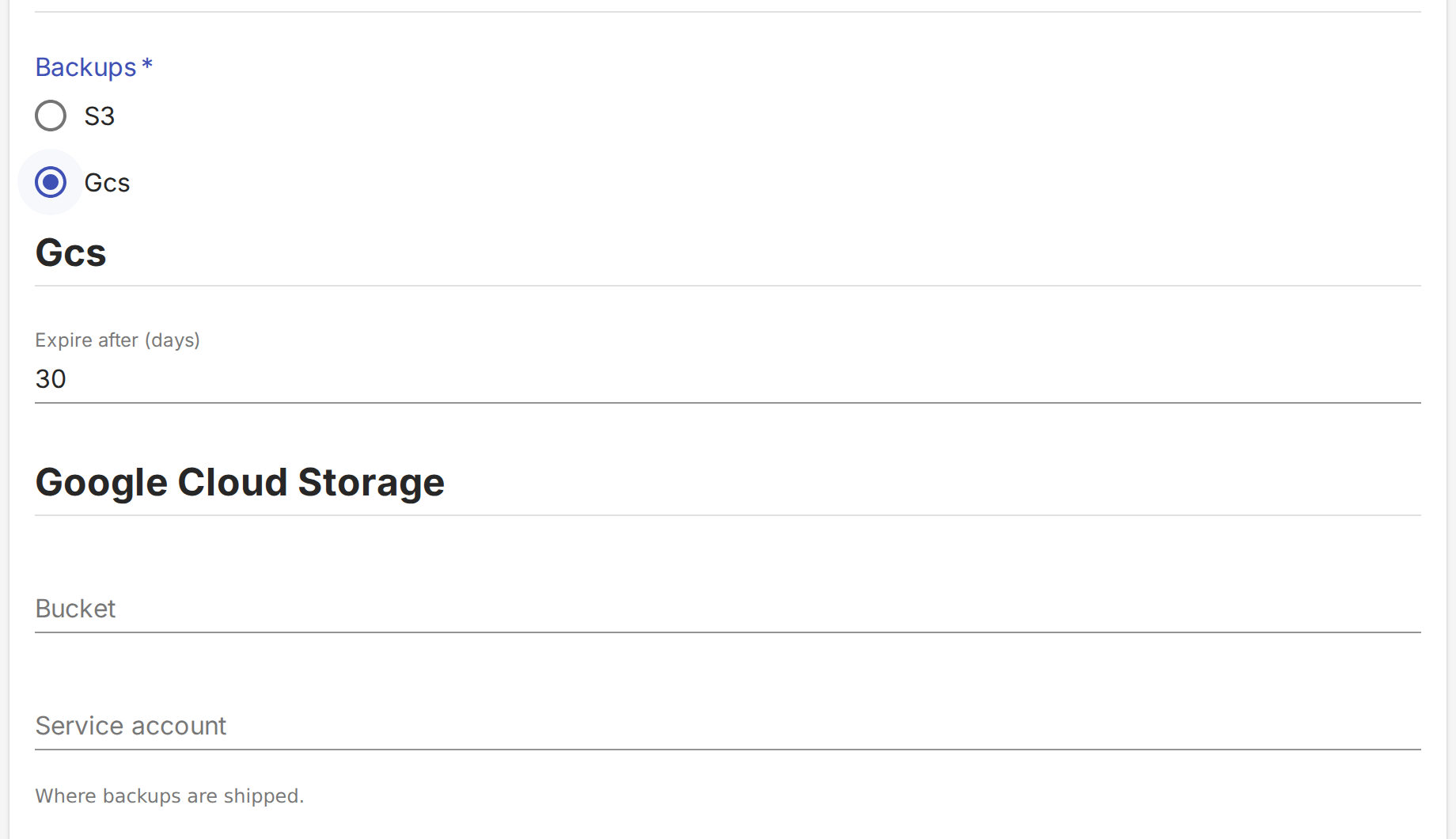
Backstage labels each radio button after the property its option requires, which is where "S3"
and "Gcs" come from. A property no option requires, like expireAfterDays, is shared and
appears whichever option is selected.
Give every option at least one property in required. An option without one is an error, and the
Promise fails to sync. The developer has to pick an option, so the field itself becomes required.
Validation
Backstage checks pattern, the length keywords and the range keywords in the browser, so the
developer sees the problem before they submit.
teamEmail:
  type: string
  title: Team email
  description: Who to page when this database misbehaves.
  pattern: '^[^@]+@example\.com$'
  minLength: 5
  maxLength: 64
replicas:
  type: integer
  title: Replicas
  minimum: 1
  maximum: 5
The generator appends Must match regular expression '<pattern>' to the description of any
property that has a pattern. Backstage turns anything in a description that looks like a URL or
an email address into a link, so a pattern containing either comes out badly:

^[^@]+@example.com$ has been linkified, leaving the pattern hard to readFor anything longer than a simple pattern, replace this with a validation message of your own.
Lists and nested objects
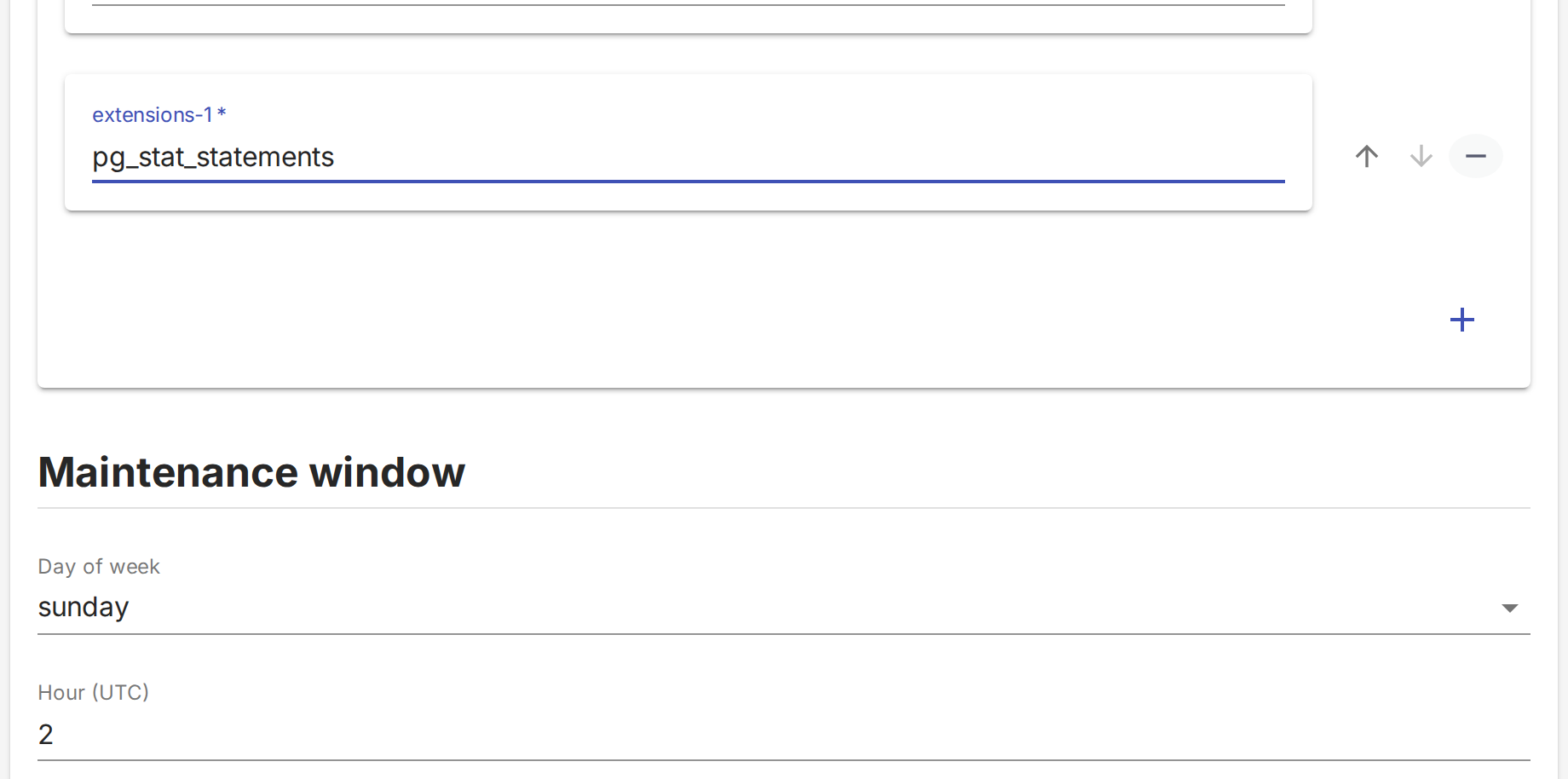
An array renders as a list the developer adds items to. A nested object renders as a group of
fields under its own heading.
extensions:
  type: array
  title: Extensions
  description: Postgres extensions to enable.
  maxItems: 5
  items:
    type: string
maintenance:
  type: object
  title: Maintenance window
  properties:
    dayOfWeek:
      type: string
      title: Day of week
      enum: [sunday, monday, tuesday]
      default: sunday
    hourUTC:
      type: integer
      title: Hour (UTC)
      minimum: 0
      maximum: 23
      default: 2
Reference
| CRD schema | Effect on the form |
|---|---|
title | Field label |
description | Helper text below the field |
required | Field is mandatory and marked with an asterisk |
default | Field is prefilled with the value |
enum | Dropdown of the listed values |
pattern, minLength, maxLength | String validation. The pattern is also appended to the description |
minimum, maximum, exclusiveMinimum, exclusiveMaximum, multipleOf | Numeric validation |
format | Passed through to Backstage, for example email |
type: array, minItems, maxItems | A list the developer adds items to |
type: object with properties | A group of nested fields |
oneOf with required per option | Radio buttons showing only the selected option's fields |
x-kubernetes-validations with self == oldSelf | Read-only on the Manage tab, editable on create |
Behaviour you add with a PortalCustomization
A PortalCustomization runs after the request template is generated and patches it in place. Use
one when what you want belongs to the template rather than to your API, such as layout and
wording, or when Backstage can do something your CRD has no way to ask for.
Each example below is a complete PortalCustomization. The change itself is a
Portal Patch recipe, one entry under args, applied to the documents
the generator wrote. A Promise binds to a single PortalCustomization, so to make more than one
of these changes, add each recipe as another args entry rather than creating a second resource.
Customization covers binding a Promise to a customization.
Put every recipe here in spec.promise.configure. The request template is generated once per
Promise, not once per request.
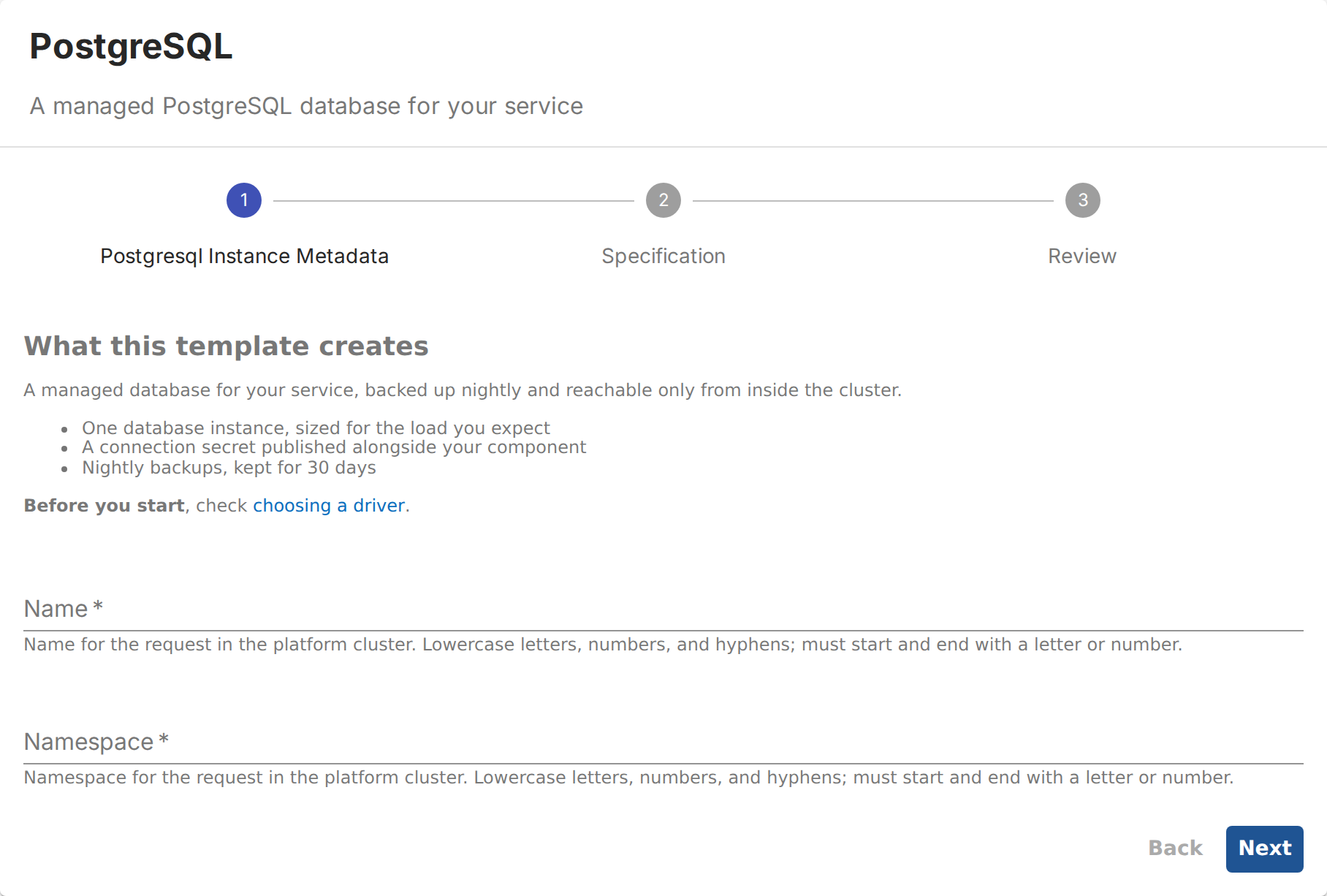
Add a description to the template
By default a request form opens straight onto its fields, with nothing to say what the resource
is. A description on a page of the template's spec.parameters fills that gap: Backstage
renders it as Markdown above that page's fields, both when the resource is requested and when it
is updated.
apiVersion: platform.syntasso.io/v1alpha1
kind: PortalCustomization
metadata:
  name: postgresql-request-template
spec:
  portalType: backstage
  promise:
    configure:
      containers:
        - name: portal-patch
          image: ghcr.io/syntasso/portal-patch:v0.8.0
          args:
            - |
              target:
                kind: Template
                list:
                  path: spec.parameters
                  key: title
                  value: "Postgresql Instance Metadata"
              patch:
                description: |
                  ## What this template creates

                  A managed database for your service, backed up nightly and reachable only
                  from inside the cluster.

                  - One database instance, sized for the load you expect
                  - A connection secret published alongside your component
                  - Nightly backups, kept for 30 days

                  **Before you start**, check [choosing a driver](https://example.com/docs).
Postgresql Instance Metadata is the title the generator gives the first page, built from your
CRD's kind. Substitute your own, or the selector matches nothing and the sync fails.
Field order
Every spec field shares one page, titled "Specification", unless the portal turns that off with
--single-spec-page=false. ui:order sets the
order the fields appear in on it:
apiVersion: platform.syntasso.io/v1alpha1
kind: PortalCustomization
metadata:
  name: postgresql-request-template
spec:
  portalType: backstage
  promise:
    configure:
      containers:
        - name: portal-patch
          image: ghcr.io/syntasso/portal-patch:v0.8.0
          args:
            - |
              target:
                kind: Template
                list:
                  path: spec.parameters
                  key: title
                  value: Specification
              patch:
                properties:
                  spec:
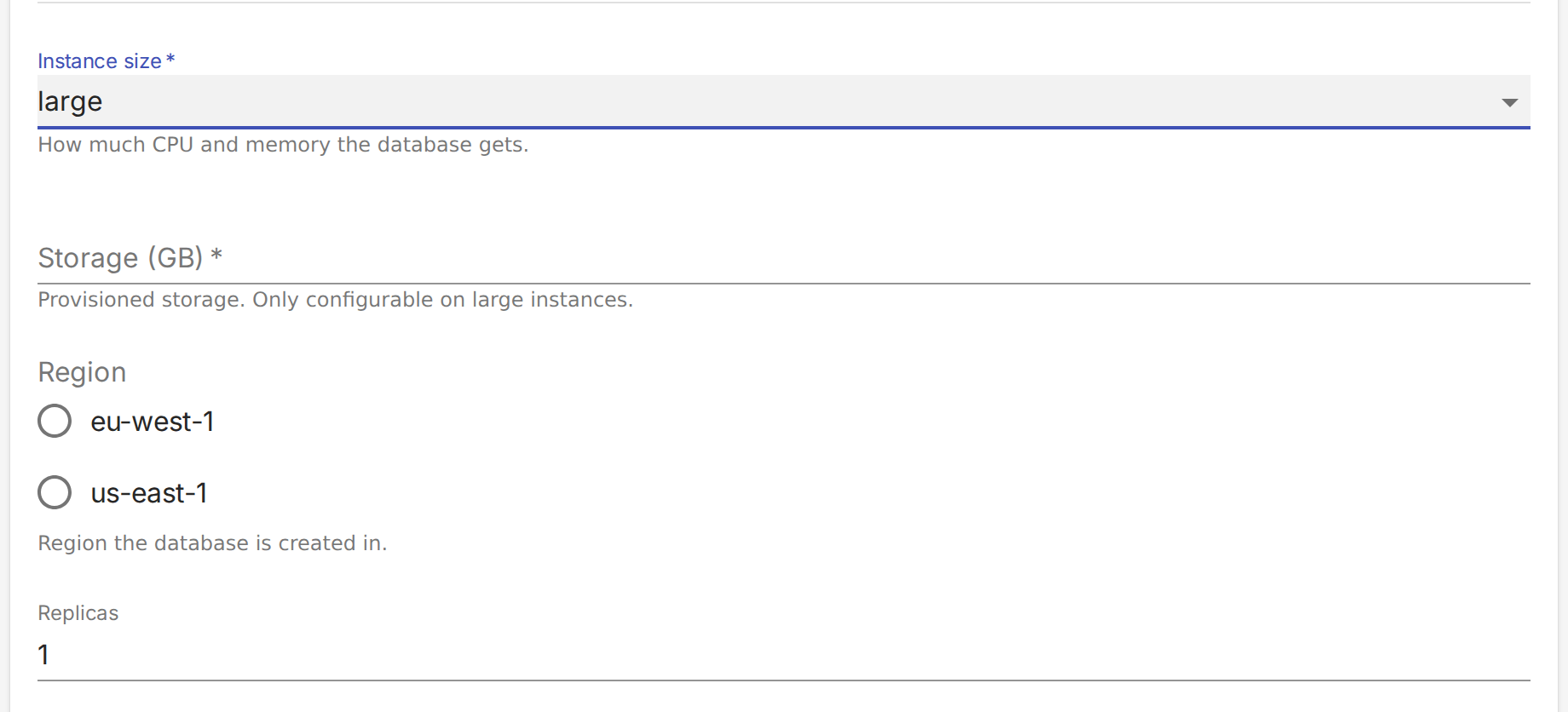
                    ui:order: [size, storageGB, region, replicas, "*"]
ui:order has to account for every property on the page. Miss one and Backstage replaces the
form with uiSchema order list does not contain properties '<name>' and a dump of the raw schema.
The "*" above catches everything not named before it; without it, every property has to appear
in the list.
ui:order names them. Everything else follows under "*"Show a field only for certain choices
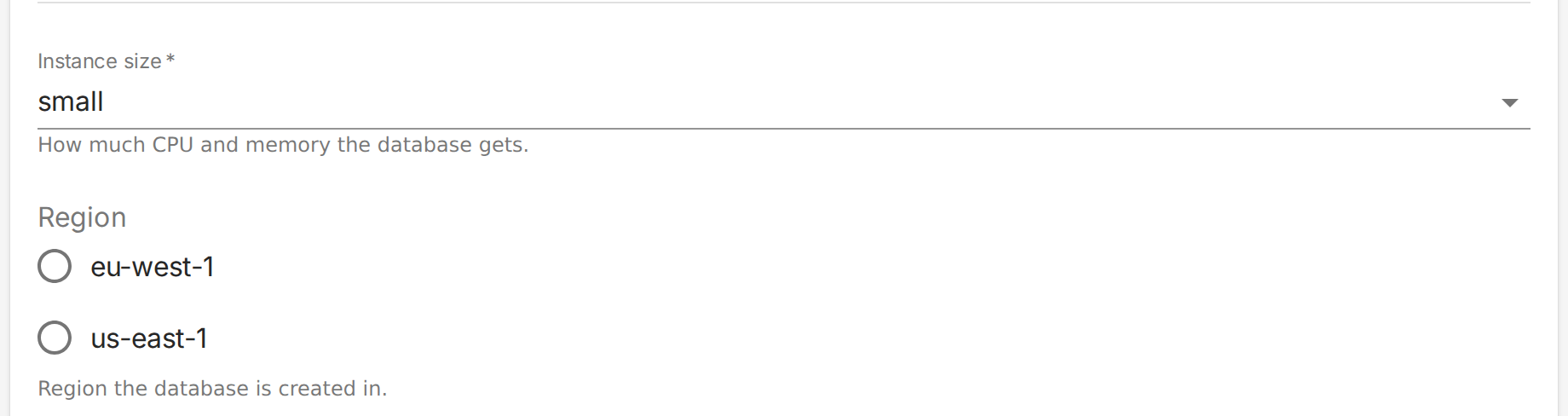
Storage size is only worth asking about on a large instance. To hide storageGB until the
developer picks large, take it out of properties and describe it in a dependencies block
instead:
apiVersion: platform.syntasso.io/v1alpha1
kind: PortalCustomization
metadata:
  name: postgresql-request-template
spec:
  portalType: backstage
  promise:
    configure:
      containers:
        - name: portal-patch
          image: ghcr.io/syntasso/portal-patch:v0.8.0
          args:
            - |
              target:
                kind: Template
                list:
                  path: spec.parameters
                  key: title
                  value: Specification
              patch:
                properties:
                  spec:
                    properties:
                      storageGB: null
                    dependencies:
                      size:
                        oneOf:
                          - properties:
                              size:
                                enum: [small]
                          - properties:
                              size:
                                enum: [medium]
                          - properties:
                              size:
                                enum: [large]
                              storageGB:
                                type: integer
                                title: Storage (GB)
                                description: Provisioned storage. Only configurable on large instances.
                            required: [storageGB]
Setting storageGB to null removes it from the form. The dependencies block is keyed on
size, the field whose value determines what appears, with one branch for each value. The large
branch puts storageGB back and makes it mandatory, while small and medium add nothing, so it
stays hidden.
Every value needs a branch, even the ones that add nothing. Miss one and the form refuses to
submit with 'Specification' must match exactly one schema in oneOf, which tells a developer
nothing they can act on.
The field still has to exist on your CRD. This recipe only changes when it is visible, and the
API server strips anything the CRD does not declare. Leave its name in ui:order too: a name
matching nothing is ignored, and it puts the revealed field where you want it instead of at the
end of the page.
small, Storage (GB) is not on the form at all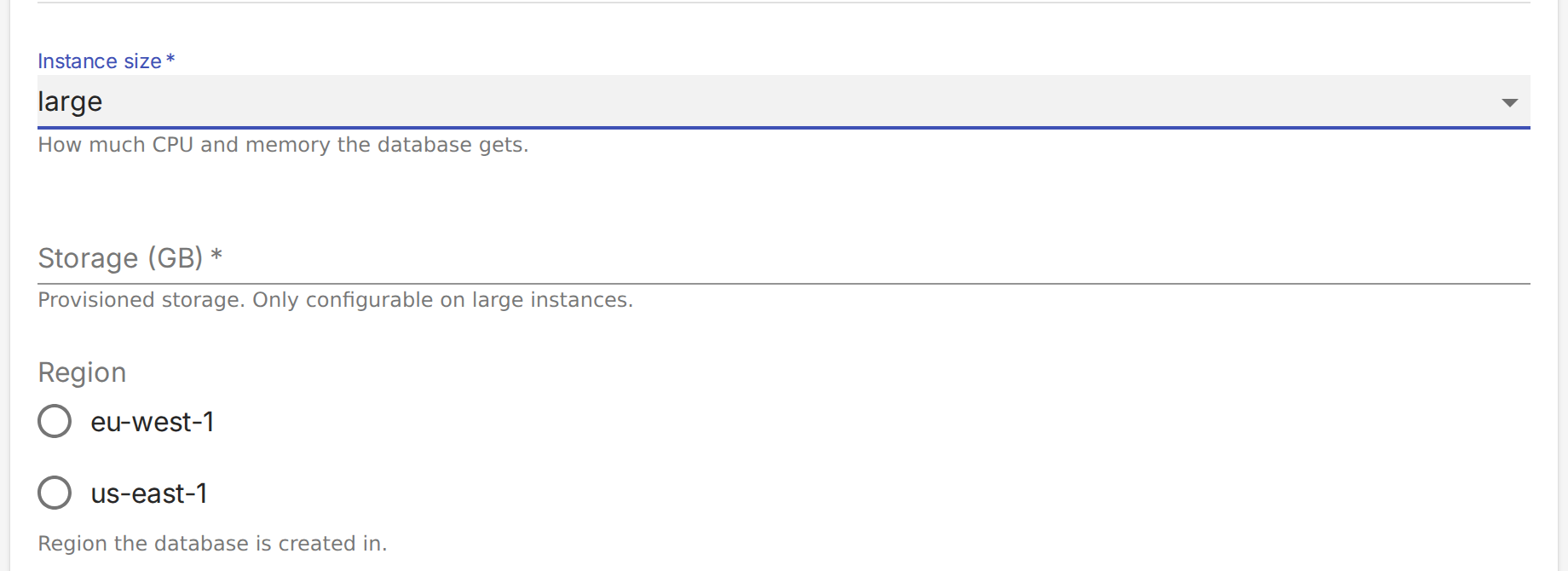
large, it appears where ui:order puts it, and is requiredBackstage does not clear a value when the field that revealed it disappears. Pick large, type a
storage size, change back to small, and the request carries both size: small and the storage
size you typed.
Add the same rule to the CRD, so the API server rejects a request that breaks it:
spec:
  type: object
  x-kubernetes-validations:
    - rule: "self.size == 'large' || !has(self.storageGB)"
      message: storageGB may only be set when size is large
Better validation messages
errorMessage replaces what Backstage says when a keyword fails, keyed by the keyword that
failed. Pair it with ui:help to tell the developer what you want before they get it wrong, and
trim the description so the raw pattern is no longer in it:
apiVersion: platform.syntasso.io/v1alpha1
kind: PortalCustomization
metadata:
  name: postgresql-request-template
spec:
  portalType: backstage
  promise:
    configure:
      containers:
        - name: portal-patch
          image: ghcr.io/syntasso/portal-patch:v0.8.0
          args:
            - |
              target:
                kind: Template
                list:
                  path: spec.parameters
                  key: title
                  value: Specification
              patch:
                properties:
                  spec:
                    properties:
                      teamEmail:
                        description: Who to page when this database misbehaves.
                        ui:help: Use a team alias, not a personal address.
                        errorMessage:
                          pattern: must be an @example.com address

ui:help underneath itChange how a field is rendered
Any ui: key Backstage understands can be patched onto a property. ui:widget picks a different
widget for the same data, so an enum of two values can be radio buttons rather than a dropdown:
apiVersion: platform.syntasso.io/v1alpha1
kind: PortalCustomization
metadata:
  name: postgresql-request-template
spec:
  portalType: backstage
  promise:
    configure:
      containers:
        - name: portal-patch
          image: ghcr.io/syntasso/portal-patch:v0.8.0
          args:
            - |
              target:
                kind: Template
                list:
                  path: spec.parameters
                  key: title
                  value: Specification
              patch:
                properties:
                  spec:
                    properties:
                      region:
                        ui:widget: radio

enum as radio buttons rather than a dropdownBackstage's ui:options examples list the widgets available. A widget that does not suit the property's type renders nothing at all rather than reporting an error.
To narrow one dropdown by what was chosen in another, the SKE frontend ships a
ScopedEntityPicker that you select the same way, with
ui:field.
Related pages
- Customization for the
PortalCustomizationresource and how to bind a Promise to one - Portal Patch recipe reference for the full recipe grammar
- SKE Frontend Plugin for the Manage tab and the field extensions the plugin ships
- Writing a Promise for the Promise API itself
