The Parts of a Platform
This document walks through the parts you would typically find in a Platform, with all the components that you need to run SKE in a production environment.
Below is a diagram of the parts of a Platform:
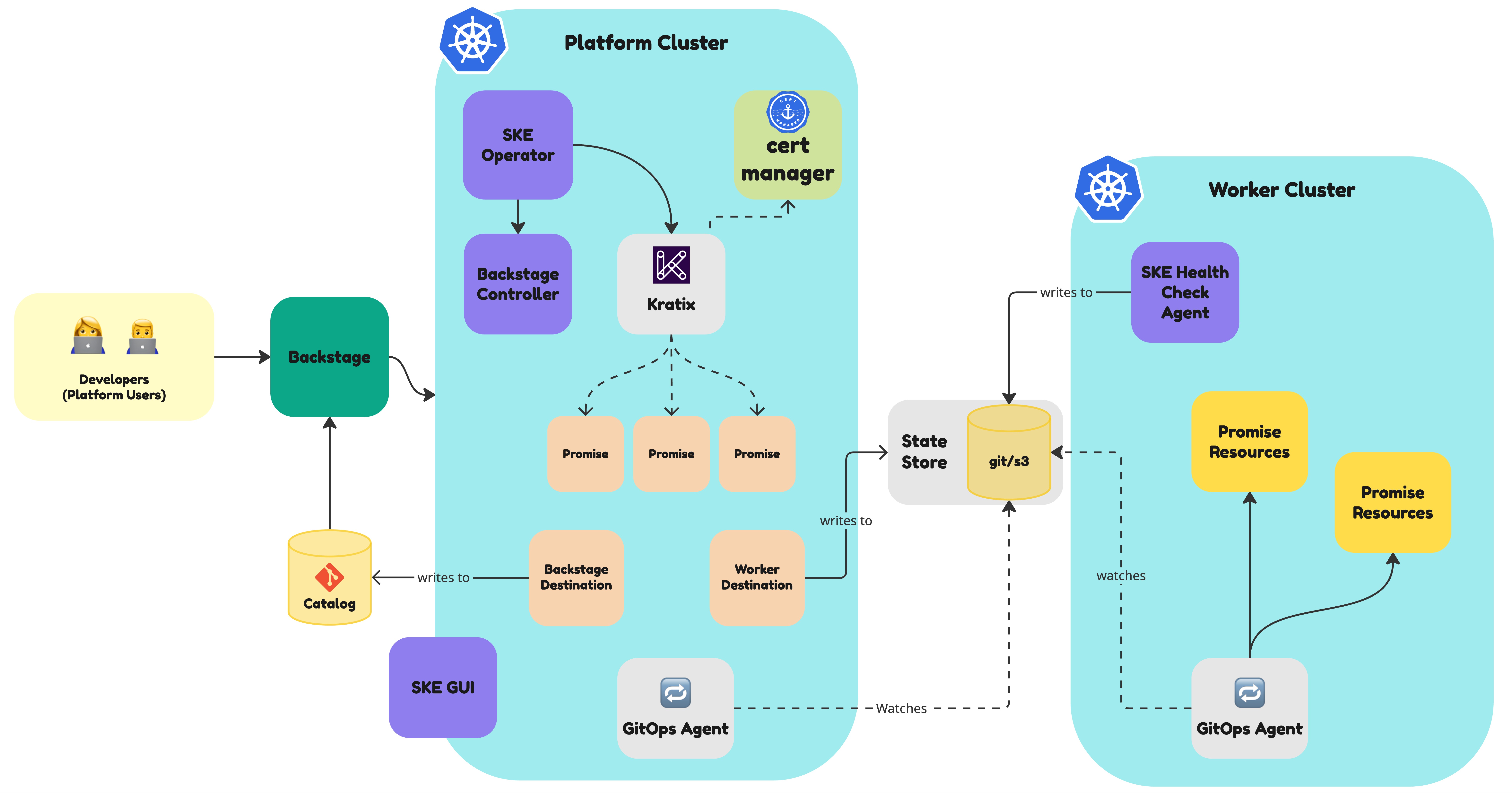
Central to the Platform is the Platform Cluster. This is the cluster where Kratix is installed, where all the Promises will be made available, and where the users will send their requests to.
Kratix comes with its own webhooks, so it needs certificates to be configurable. You can provide the certificates yourself, or use cert-manager to generate them. To install cert-manager, follow the instructions in the cert-manager documentation.
Kratix is usually deployed via the SKE Operator. The SKE Operator provides full lifecycle support for Syntasso Kratix Enterprise (SKE) and is the recommended approach for installing and managing your SKE installation. It is installed in the Platform Cluster, and will manage the installation of Kratix for you. To install the SKE Operator, follow the instructions in the SKE Operator documentation.
The SKE Operator can also deploy the Portal Controller, which is an optional component that can be used to integrate your Platform with a developer portal such as Backstage or Cortex. The Portal Controller will automatically generate the portal entities when Promises or resources are created or updated. To install the Portal Controller, follow the instructions in the Portal Controller documentation. For Backstage, the controller writes catalogue documents through a Destination backed by a Git or bucket StateStore, which Backstage must discover. For Cortex, it calls the Cortex API directly.
The diagram above shows Backstage as a possible interface to the Platform. However, your users may interact via different interfaces, such as a CLI or a web portal. SKE includes integrations with a number of Portals, like Port.
To visualise and manage your Platform, SKE comes with an optional GUI that can be deployed in the Platform Cluster. To install the GUI, follow the instructions in the GUI documentation.
Still in the Platform Cluster, you will likely want to deploy a GitOps Agent like FluxCD or ArgoCD. The GitOps Agent is required for Compound Promises to work. It is also one of the two ways Health Checks get their records back to the Platform; the other is the SKE Platform Manager reading them from a bucket, which needs no GitOps Agent on the Platform (see Move health records onto a bucket). To install the GitOps Agent, follow the instructions in the GitOps Agent documentation.
Kratix schedules workloads to Destinations, like the Worker Cluster in the diagram above, via a State Store (Git Repository or S3-Compatible). The Worker Cluster watch the State Store for changes, and apply them to the cluster via a GitOps Agent. Each Worker Cluster should have its own GitOps Agent running.
Finally, in the Worker Cluster, you may want to deploy the SKE Health Check agent, to run the health checks defined in the Promises. To install the Health Check agent, follow the instructions in the Health Check agent documentation.
