DEPRECATED Backstage Integration Introduction
The standalone Backstage Controller is deprecated. It continues to work; see Migrating from the Backstage Controller when you are ready to move.
Backstage is a framework for building developer portals, while Kratix is a framework for building Platforms. Both systems can integrate with each other to provide an end-to-end self-service experience for developers.
With the SKE Integration for Backstage, you can automate the process of populating the Backstage catalogue with Components and Templates corresponding to Promises on the platform. Developers can then send requests to Kratix through Backstage Templates to create and manage Resources.
This section explains the integration architecture and the steps required to install it in a Backstage environment.
What the integration provides
The Backstage integration enables platform teams to:
- Publish Kratix Promises as Backstage Components
- Publish Kratix Resources as Backstage Components
- Generate Backstage Templates from Promise APIs
- Let developers create Resource requests from Backstage
- Show live status from the platform cluster
Architecture
The integration consists of SKE components, Backstage plugins, and shared storage. Each part has a specific role:
- Backstage Controller: runs in the platform cluster and enables automatic Backstage entity generation for labelled Promises. It adds the generation workflow that produces Backstage Components and Templates for Promises and Resource requests.
- SKE frontend plugin: runs in Backstage and renders SKE-specific pages for Promise and Resource Components.
- SKE backend plugin: runs in the Backstage backend and provides the actions used by generated Templates. It sends Resource requests to Kratix through Kubernetes API mode, GitOps mode, or Hybrid mode.
- State store and Destination: provide the hand-off between Kratix and Backstage. Kratix writes generated Backstage entities to the Destination, and Backstage reads those entities from the same bucket or repository.
To integrate Kratix with Backstage, you will need to do the following:
- Install the SKE Backstage Controller.
- Configure Backstage to communicate with your Kubernetes cluster or GitOps repository.
- Install and configure the SKE Backstage plugins.
- Configure Kratix to send Backstage entities to a state store.
- Configure Backstage to read its catalogue from the same state store.
- Label your Promises for Backstage entity generation.
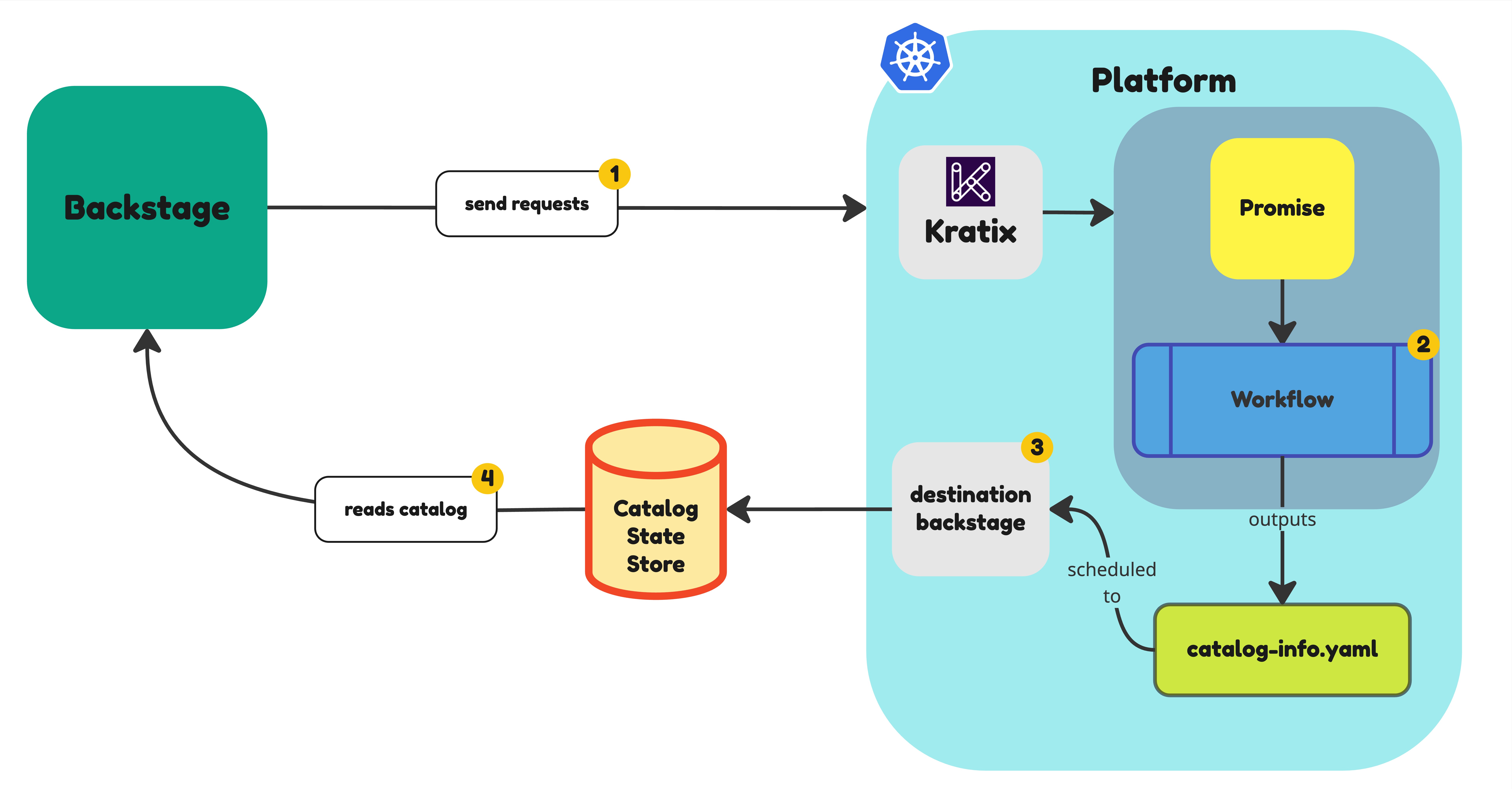
The following sections will go through each of these steps in detail:
-
Create the Entity State Store — Configure a Kratix State Store and Destination so Kratix knows where to write Backstage entity files. Backstage and Kratix must point at the same store.
-
Configure Catalogue Ingestion — Configure Backstage to read its Software Catalog from the State Store that Kratix writes to.
-
Install and Configure the Plugins — Install the
@syntasso/plugin-ske-frontendand@syntasso/plugin-ske-backendpackages into your Backstage app. The frontend plugin renders dedicated pages for Kratix Promises and Resources; the backend plugin handles Resource Requests and catalog queries. -
Install the Backstage Controller — Deploy the Backstage Controller via the SKE Operator to automatically generate Backstage Components and Templates from your Kratix Promises.
Advanced Configuration
- Configuring OIDC Authentication — Configure Backstage to authenticate with the platform cluster using an OIDC provider for fine-grained access control.
Getting started quickly
If you want to try out the integration before committing to a full installation, the Backstage Development Image provides a pre-configured Backstage instance for development and testing purposes.
