MCP Server (Preview)
This integration is in Preview mode and is not covered by the Syntasso SLA. If you are evaluating or using it, contact Syntasso to discuss applicability and expectations.
Overview
The Kratix MCP Server exposes your Kratix platform capabilities (browsing Promises, checking Destinations, and submitting requests) to AI agents over the Model Context Protocol.
This server is included in both SKE (Syntasso Kratix Enterprise) and SKA (Syntasso Kratix Agentic).
When you invest in Promises as your platform's standard API, you want your users' AI clients to discover and use those capabilities immediately. The Kratix MCP Server runs inside your cluster, connects to your platform's Promises, and makes them accessible in a secure, standard way to any MCP-compatible AI client.
Platform teams deploy the server once. Users register it with their AI client of choice and start asking questions about the platform from inside their editor.
Prerequisites
- A Syntasso registry token
- A Kubernetes cluster running Kratix
- A public HTTPS URL for the MCP endpoint
- An OpenID Connect (OIDC) identity provider that can issue access tokens to your MCP clients
- An MCP-compatible AI client on each user's machine
Deploying the server
The server must run on the same cluster as Kratix, where it can reach the Kratix API resources directly. It deploys into the kratix-platform-system namespace alongside the Kratix platform components.
Configure OIDC
The MCP server is an OAuth 2.1 resource server. Configure your identity provider to issue signed access tokens with:
- An audience matching the server's canonical MCP URL, for example
https://mcp.example.com/mcp - A stable subject claim for each person
- A group-membership claim if you bind Kubernetes RBAC to groups
- The scopes needed by each user:
promises:read,requests:read,requests:writeanddestinations:read
For human callers, the server uses every value in the configured group claim. It does not filter a broader directory group list down to Kubernetes-specific groups. Configure the identity provider to emit a dedicated claim if users belong to groups that the server should not pass to Kubernetes.
The identity provider must support the OAuth authorisation-code flow used by your MCP clients. If clients register themselves, it must also support Dynamic Client Registration or provide an equivalent process for registering them.
Configure the Deployment with at least:
| Variable | Purpose | Default |
|---|---|---|
OIDC_ISSUER | Exact HTTPS issuer URL for accepted tokens | Required |
MCP_RESOURCE_URL | Public HTTPS URL of this server's /mcp endpoint and its expected token audience | Required |
OIDC_GROUPS_CLAIM | Token claim containing the caller's groups | groups |
IMPERSONATION_USER_PREFIX | Prefix added to human identities before Kubernetes sees them | mcp:user: |
IMPERSONATION_GROUP_PREFIX | Prefix added to token groups before Kubernetes sees them | Empty |
Your identity provider may require additional configuration, such as an audience mapper or a rule that identifies machine clients correctly.
Enable per-caller RBAC
If you install with the ske-mcp-server Helm chart, per-caller authorisation is opt-in. Configure the effective group names that the server may impersonate:
rbac:
  impersonation:
    enabled: true
    groupPrefix: "mcp:group:"
    groupAllowlist:
      - "mcp:group:platform-viewers"
The release manifests under deploy/kubernetes/ already grant the server permission to impersonate users and an explicit allowlist of groups. Edit that group allowlist to match your identity provider before applying the manifests:
kubectl apply -f deploy/kubernetes/
Both installation methods give the ServiceAccount permission to impersonate callers. You must separately create Roles and RoleBindings for the Promise request resources those callers may use. The server does not create customer-specific access rules.
MCP_AUTH_TOKEN enables a shared bearer token for local development. It disables OIDC, OAuth scopes and per-caller impersonation, so every Kubernetes operation uses the server's ServiceAccount. Do not use this mode for customer-facing deployments.
Connecting users
The server uses the Streamable HTTP transport. Give users the server URL; each user then completes their own browser-based OAuth login. Do not distribute a shared bearer token.
Claude Code
claude mcp add --scope user --transport http ske-mcp-server <SERVER_URL>/mcp
claude mcp login ske-mcp-server
See the Claude Code MCP docs for more options.
Cursor
Add the following to ~/.cursor/mcp.json:
{
  "mcpServers": {
    "ske-mcp-server": {
      "url": "<SERVER_URL>/mcp"
    }
  }
}
Cursor opens the OAuth login flow when it first connects.
See the Cursor MCP docs for more options.
GitHub Copilot in VS Code
Add the following to .vscode/mcp.json in your workspace, or to your user settings:
{
  "servers": {
    "ske-mcp-server": {
      "type": "http",
      "url": "<SERVER_URL>/mcp"
    }
  }
}
VS Code opens the OAuth login flow when it first connects. If your identity provider does not support Dynamic Client Registration, add the registered client ID through VS Code's oauth configuration.
See the VS Code MCP docs for more options.
Per-caller Kubernetes permissions
When OIDC and impersonation RBAC are enabled, request-resource operations run as the verified caller:
- The user authenticates. The identity provider issues a token containing their identity, groups and OAuth scopes.
- The server verifies and maps the identity. It validates the token, then derives the Kubernetes username and groups. The server uses its own ServiceAccount credential; it never receives or forwards the user's Kubernetes credentials.
- Kubernetes authorises the operation. The server sends
Impersonate-UserandImpersonate-Groupheaders. Kubernetes evaluates every RoleBinding and ClusterRoleBinding applying to that effective identity.

Bind human callers to request permissions
The effective Kubernetes identity includes the configured prefixes. With the example Helm values above:
- The subject
alicebecomesmcp:user:alice. - The token group
platform-viewersbecomesmcp:group:platform-viewers.
Write RoleBindings against these effective values. Existing bindings against the raw subject or group will not match unless you leave the corresponding prefix empty.
Every effective group in a caller's token must also appear in the ServiceAccount's impersonation allowlist. If one group is missing, Kubernetes rejects the entire impersonated request.
Configure machine callers
A machine using the client-credentials flow has a fixed identity:
- Username:
IMPERSONATION_CLIENT_PREFIXplus its client ID; the default prefix ismcp:client:. - Groups:
IMPERSONATION_CLIENT_GROUPS; token group claims are ignored.
You can bind RBAC directly to one machine username. Use IMPERSONATION_CLIENT_GROUPS when several machine clients should share the same permissions, and include those groups in the ServiceAccount's impersonation allowlist.
Caveats
- Promise and Destination catalogue reads use the server's ServiceAccount because every authenticated caller receives the same read-only catalogue.
- Namespace filtering uses Kubernetes access reviews before listing request resources. Namespaces the caller cannot list are omitted without revealing how many were filtered.
- Creating a request is attempted directly as the caller. A denied write names the verb, resource and namespace.
- Kubernetes automatically adds groups such as
system:authenticated; RBAC applying to those groups also affects the caller. - Kubernetes Events describing successful submissions are created through the server's ServiceAccount, so the caller cannot suppress them through their own RBAC. Events are operational records rather than a replacement for Kubernetes Audit logging.
Querying your platform
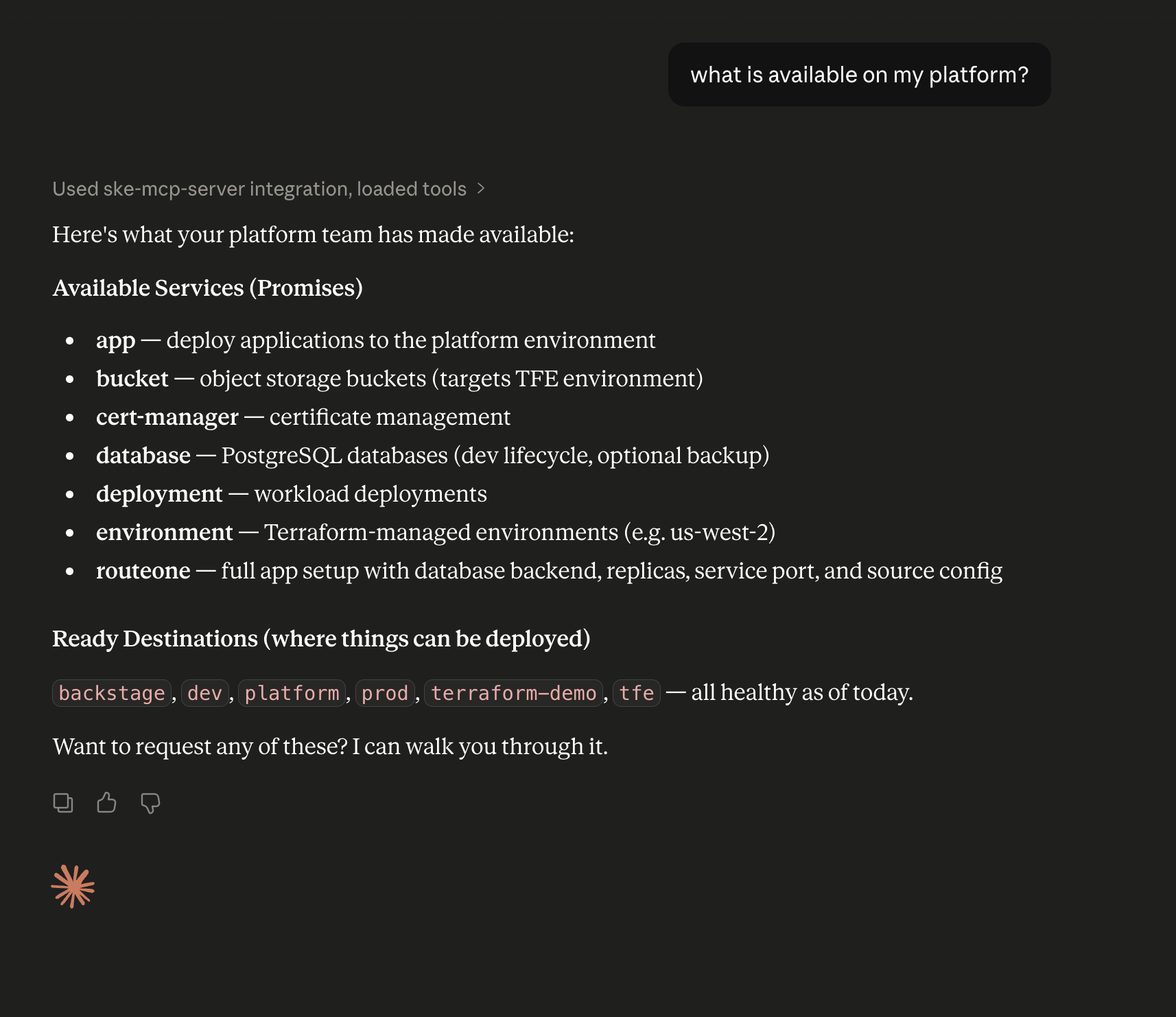
Once connected, users can ask natural language questions about the platform directly in their AI client:
- What can I request from my platform?
- What destinations can I deploy my
<Promise type>to? - I need a
<Promise type>. What can I configure? - What's the status of my
<request name>request?
The server provides the AI agent with the tools to answer these questions and, when the user is ready, submit a validated request through the platform's Promise workflows.
Available tools
| Tool | What it does |
|---|---|
fetch_promises | List available Promises |
guide_request_workflow | Guide a full request workflow — discovery, planning, validation, and submit readiness — in one call |
describe_promise_requestable | Promise summary, schema, and submit hints in one view |
fetch_ready_destinations | Destinations that can accept requests |
fetch_destination_contexts | Which destinations match a Promise's placement selectors |
fetch_full_promises | Promises expanded with their matching resource instances |
fetch_promise_requests | Requests scoped to a single Promise |
get_request_status | Look up a single request by name and namespace |
find_request_status | Find a request's status without knowing its exact name; picks the most recent match |
validate_promise_request | OpenAPI-schema preflight check before submitting |
submit_promise_request | Create a namespaced request; stamps the requesting user and emits a Kubernetes Event |
Debugging the server
To inspect the server interactively independent of any AI client, use the MCP Inspector. Configure it with:
| Field | Value |
|---|---|
| Transport | Streamable HTTP |
| URL | <SERVER_URL>/mcp |
| Authentication | Complete the OAuth flow in the Inspector's Auth Settings |
