Creating a Promise from a Terraform Module
Terraform Modules are a common starting place for the creation of Promises. We know that a lot of organisations take advantage of Terraform already and the declarative nature of Terraform lends itself well to the definition of declarative Promise workflows. In short: Kratix and Terraform are good friends and our Terraform integrations make then even more compatible.
In this guide, we'll be creating a Promise from a Terraform module using both the Kratix CLI and the TF State Finder Pipeline stage. We'll be:
- defining an API that reflects the configurable Terraform values
- creating declarative workflows to generate the infrastructure to deploy
- surfacing the Terraform outputs in the status of Resource Requests
Pre-requisites
You will need:
- An installation of SKE. Go to Configuring SKE and follow the appropriate guide if you haven't done so already.
- The kratix CLI
- A Terraform workspace configured to watch a Git repository. As we'll also be creating an AWS resource, this Workspace should have AWS credentials configured.
- A Terraform Destination that is backed by a GitStateStore that references the above repository. You can follow the Configuring the Destination documentation to set up your Destination.
Initializing the Promise from the Terraform Module
The Terraform Module we'll be using within this workshop is the AWS S3 Bucket
Module which provisions s3 buckets. To get started, let's bootstrap the
Promise with the init tf-module-promise command:
kratix init tf-module-promise s3 \
    --module-source "git::https://github.com/terraform-aws-modules/terraform-aws-s3-bucket.git?ref=v5.10.0" \
    --group example.syntasso.io \
    --kind S3 \
    --version v1alpha1 \
    --generate-outputs \
    --dir s3-promise
The API
Looking closely at the command, the init tf-module-promise command generates a Promise from the Terraform module referred to in the --module-source.
It transforms the variables that can be configured in the module into properties of the Promise API.
Take a look at the generated promise.yaml in the newly created s3-promise directory. The group, version and kind mirror those that
were specified when initializing the Promise:
apiVersion: platform.kratix.io/v1alpha1
kind: Promise
metadata:
  name: s3
  labels:
    kratix.io/promise-version: v0.0.1
spec:
  api:
    apiVersion: apiextensions.k8s.io/v1
    kind: CustomResourceDefinition
    metadata:
      name: s3s.example.syntasso.io
    spec:
      group: example.syntasso.io
      names:
        kind: S3
        plural: s3s
        singular: s3
The S3 Module the Promise was generated from included a number of
variables, which have now been converted to
properties in the API. Take the create_bucket variable for instance:
variable "create_bucket" {
  description = "Controls if S3 bucket should be created"
  type        = bool
  default     = true
}
This is now reflected by a property of the same name with same type, description and default:
  - name: v1alpha1
    schema:
      openAPIV3Schema:
        properties:
          spec:
            default: {}
            properties:
...
              create_bucket:
                default: true
                description: Controls if S3 bucket should be created
                type: boolean
Destination Selectors
As the Promise will be generating Terraform configurations, the generated files must be scheduled to a destination that can handle these files. In this case, the Terraform destination created as part of the pre-requisites.
In keeping with this, you'll see that the promise has destinationSelectors that ensure workflows are written to a destination with the
label environment: terraform:
  destinationSelectors:
    - matchLabels:
        environment: terraform
Workflows
You'll find that a resource.configure workflow has also been added to the promise.yaml:
  workflows:
    resource:
      configure:
        - apiVersion: platform.kratix.io/v1alpha1
          kind: Pipeline
          metadata:
            name: instance-configure
          spec:
            containers:
            - env:
              - name: MODULE_SOURCE
                value: git::https://github.com/terraform-aws-modules/terraform-aws-s3-bucket.git?ref=v5.10.0
              - name: MODULE_OUTPUT_NAMES
                value: s3_bucket_id,s3_bucket_arn,s3_bucket_bucket_domain_name,s3_bucket_bucket_regional_domain_name,s3_bucket_hosted_zone_id,s3_bucket_lifecycle_configuration_rules,s3_bucket_policy,s3_bucket_region,s3_bucket_website_endpoint,s3_bucket_website_domain,s3_directory_bucket_name,s3_directory_bucket_arn,aws_s3_bucket_versioning_status,s3_bucket_tags
            image: ghcr.io/syntasso/kratix-cli/terraform-generate:v0.6.0
            name: terraform-generate
The ghcr.io/syntasso/kratix-cli/terraform-generate:v0.6.0 image takes the inputs provided via the API and uses these to generate a
Terraform configuration that honours these inputs.
The image only writes Terraform files. It does not run Terraform. Kratix schedules the files to your Terraform Destination, and the Terraform workspace watching that repository applies them. Kratix and Terraform explains this and the other ways to run Terraform from a Promise.
The Promise Workflow
As the S3 Module has a terraform configuration block containing a required Provider, the declaration of this provider must be present in the
repository that is watched by Terraform. As this only needs to be declared once, it is declared as a dependency of Promise, ensuring that
the Provider block is written to the Destination before any files are generated by Resource Requests.
In the definition of the promise, you'll see the following promise.configure workflow:
    promise:
      configure:
      - apiVersion: platform.kratix.io/v1alpha1
        kind: Pipeline
        metadata:
          name: dependencies
        spec:
          containers:
          - image: my-registry.io/my-org/kratix/terraform-dependencies:v0.0.1
            name: add-tf-dependencies
You'll also see that a new workflow directory has been created at workflows/promise/configure/dependencies/add-tf-dependencies. This contains:
- a
Dockerfile - a
pipeline.shscript within thescriptsdirectory - a
versions.tffile containing theterraformconfiguration block defined in the module within theresources
This image will ensure that the contents of the resources directory are copied to the /kratix/output directory so it can be scheduled to a
Destination.
The S3 Module requires the region to be configured in the Provider block. We can add this to the versions.tf file:
cat <<EOF >> workflows/promise/configure/dependencies/add-tf-dependencies/resources/versions.tf

provider "aws" {
  region = "us-east-1"
}
EOF
To ensure this new image can be used within the Promise, build the my-registry.io/my-org/kratix/terraform-dependencies:v0.0.1 image and make it available
to the cluster. If you are using kind, you can load it to your cluster, otherwise you will need to push it to a valid image store you have push access to which
may affect the name.
docker build -t my-registry.io/my-org/kratix/terraform-dependencies:v0.0.1 workflows/promise/configure/dependencies/add-tf-dependencies
kind load docker-image my-registry.io/my-org/kratix/terraform-dependencies:v0.0.1 -n platform
Validating the generated resources
Our Promise is not yet complete, but we can validate the implementation so far to ensure that it can create s3 buckets. Install the Promise by running:
kubectl apply -f promise.yaml
Once the Promise workflow has run to completion, you will see the provider.tf file in the git repository watched by your Terraform workspace.
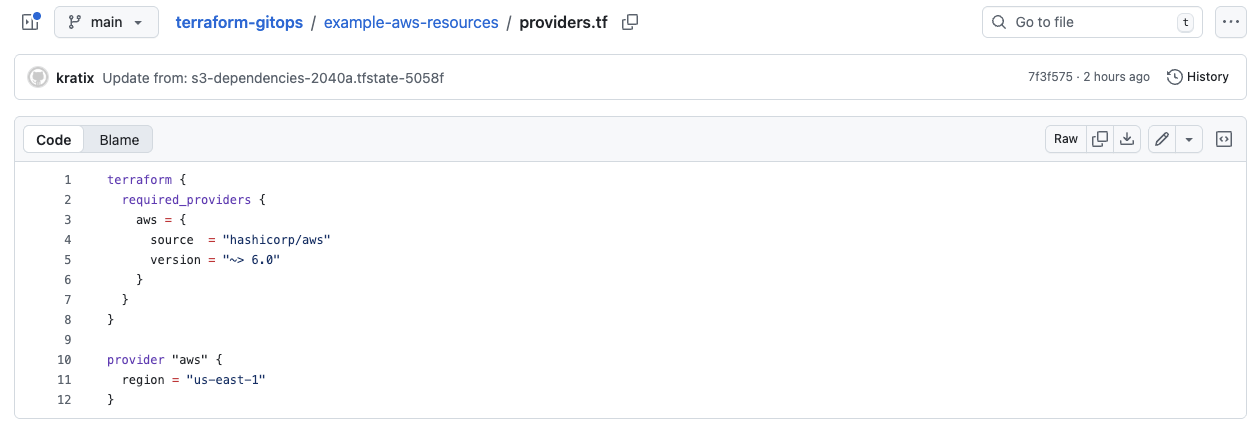
Ensure the Promise is Available with:
$ kubectl get promise s3
NAME   STATUS      KIND   API VERSION                    VERSION   MESSAGE
s3     Available   S3     example.syntasso.io/v1alpha1   v0.0.1    Promise configured
With the Promise installed, we can make a request of it. Update the example-resource.yaml to give the bucket a region:
apiVersion: example.syntasso.io/v1alpha1
kind: S3
metadata:
  name: example-s3
spec:
  region: us-east-1
Make the request with:
kubectl apply -f example-resource.yaml
In the git repository you set up for your Destination, you should eventually see output very similar to the following:
{
  "module": {
    "s3_default_example-s3": {
...
      "region": "us-east-1",
      "restrict_public_buckets": true,
      "skip_destroy_public_access_block": true,
      "source": "git::https://github.com/terraform-aws-modules/terraform-aws-s3-bucket.git?ref=v5.10.0",
      "tags": {},
      "type": "Directory",
      "versioning": {}
    }
  },
  "output": {
    "s3_default_example-s3_aws_s3_bucket_versioning_status": {
      "value": "${module.s3_default_example-s3.aws_s3_bucket_versioning_status}"
    },
    "s3_default_example-s3_s3_bucket_arn": {
      "value": "${module.s3_default_example-s3.s3_bucket_arn}"
    },
    "s3_default_example-s3_s3_bucket_bucket_domain_name": {
      "value": "${module.s3_default_example-s3.s3_bucket_bucket_domain_name}"
    }
    ...
  }
}
Note that the region is "us-east-1", which comes from our Resource Request whereas all of the other values are populated by the defaults in the Promise API.
Writing this file to the repository watched by Terraform triggers an apply in the Terraform workspace and eventually, the s3 bucket is created.
In this workshop we're using Terraform Cloud, however, this flow is possible when using other Terraform Automation and Collaboration Software within a GipOps flow.
Take a look at the output of the Terraform run, the bucket was successfully created. But, what was it called? How can we find it?
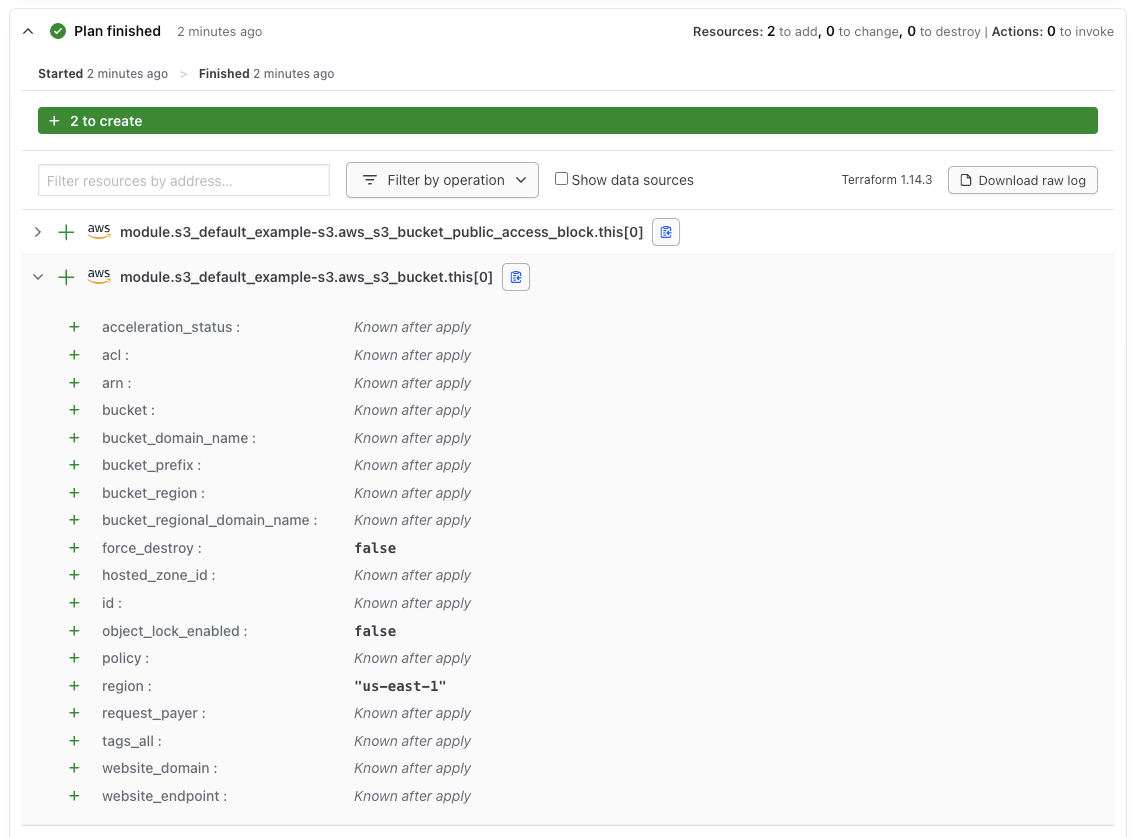
As you can see from the Terraform Plan, the name of the bucket is only known after it's creation. We didn't give the bucket a name so one has been generated randomly; this is helpful to reduce duplication but isn't great for users who have requested a promise. The only path to finding out is by looking in the AWS console which is inconvenient and many users will not have access to it.
We can make life easier for both users and ourselves by surfacing this in the status of the resource.
Surfacing Terraform outputs
You may have noticed we included the --generate-outputs flag when initializing the Promise, and that the generated Resource Configure container has an environment variable MODULE_OUTPUT_NAMES that lists the outputs we want to surface as a result of this run. The list is automatically generated based on the outputs.tf file in the module.
Don't want to include all the outputs? You can manually edit the environment variable to only include the outputs you want to surface.
By defining the MODULE_OUTPUT_NAMES, we informed the terraform-generate stage to include the outputs in the generated Terraform configuration. We now need a mechanism to surface these outputs in the Platform, so the users can see them in the Resource Request status.
This is where the tfstate-finder comes in. The tfstate-finder is a Pipeline Stage that fetches the outputs from the Terraform run and makes these visible in the Resource Request.
To utilise it, we can add a second Pipeline after the instance-configure Pipeline:
  - apiVersion: platform.kratix.io/v1alpha1
    kind: Pipeline
    metadata:
      name: output-writer
    spec:
      rbac:
        permissions:
        - apiGroups:
            - ""
          resources:
            - secrets
          verbs:
            - get
          resourceNamespace: "*"
        - apiGroups:
            - platform.kratix.io
          resources:
            - workplacements
          verbs:
            - list
            - get
        - apiGroups:
            - platform.kratix.io
          resources:
            - destinations
          verbs:
            - list
          resourceNamespace: "*"
      containers:
        - image: ghcr.io/syntasso/ske-tfstate-finder:v0.7.3
          name: fetch-output
          env:
          - name: TIMEOUT
            value: "30m"
As you can see, the Pipeline requires some additional RBAC permissions; this ensures that the stage can:
- List WorkPlacements to find the Destination associated with the Resource
- List Destinations to find the credentials needed to access TFE
- Get the Secret containing the TFE credentials
With the Promise now configured to produce terraform outputs and surface them in the resource status, we're ready to update our promise and see it working end-to-end.
Click here for the full promise.yaml file.
promise.yaml file.apiVersion: platform.kratix.io/v1alpha1
kind: Promise
metadata:
creationTimestamp: null
labels:
kratix.io/promise-version: v0.0.1
name: s3
spec:
api:
apiVersion: apiextensions.k8s.io/v1
kind: CustomResourceDefinition
metadata:
name: s3s.example.syntasso.io
spec:
group: example.syntasso.io
names:
kind: S3
plural: s3s
singular: s3
scope: Namespaced
versions:
- name: v1alpha1
schema:
openAPIV3Schema:
properties:
spec:
default: {}
properties:
acceleration_status:
description: (Optional) Sets the accelerate configuration of an
existing bucket. Can be Enabled or Suspended.
type: string
access_log_delivery_policy_source_accounts:
default: []
description: (Optional) List of AWS Account IDs should be allowed
to deliver access logs to this bucket.
items:
type: string
type: array
access_log_delivery_policy_source_buckets:
default: []
description: (Optional) List of S3 bucket ARNs which should be
allowed to deliver access logs to this bucket.
items:
type: string
type: array
access_log_delivery_policy_source_organizations:
default: []
description: (Optional) List of AWS Organization IDs should be
allowed to deliver access logs to this bucket.
items:
type: string
type: array
acl:
description: (Optional) The canned ACL to apply. Conflicts with
`grant`
type: string
allowed_kms_key_arn:
description: The ARN of KMS key which should be allowed in PutObject
type: string
analytics_self_source_destination:
default: false
description: Whether or not the analytics source bucket is also
the destination bucket.
type: boolean
analytics_source_account_id:
description: The analytics source account id.
type: string
analytics_source_bucket_arn:
description: The analytics source bucket ARN.
type: string
attach_access_log_delivery_policy:
default: false
description: Controls if S3 bucket should have S3 access log delivery
policy attached
type: boolean
attach_analytics_destination_policy:
default: false
description: Controls if S3 bucket should have bucket analytics
destination policy attached.
type: boolean
attach_cloudtrail_log_delivery_policy:
default: false
description: Controls if S3 bucket should have CloudTrail log
delivery policy attached
type: boolean
attach_deny_incorrect_encryption_headers:
default: false
description: Controls if S3 bucket should deny incorrect encryption
headers policy attached.
type: boolean
attach_deny_incorrect_kms_key_sse:
default: false
description: Controls if S3 bucket policy should deny usage of
incorrect KMS key SSE.
type: boolean
attach_deny_insecure_transport_policy:
default: false
description: Controls if S3 bucket should have deny non-SSL transport
policy attached
type: boolean
attach_deny_ssec_encrypted_object_uploads:
default: false
description: Controls if S3 bucket should deny SSEC encrypted
object uploads.
type: boolean
attach_deny_unencrypted_object_uploads:
default: false
description: Controls if S3 bucket should deny unencrypted object
uploads policy attached.
type: boolean
attach_elb_log_delivery_policy:
default: false
description: Controls if S3 bucket should have ELB log delivery
policy attached
type: boolean
attach_inventory_destination_policy:
default: false
description: Controls if S3 bucket should have bucket inventory
destination policy attached.
type: boolean
attach_lb_log_delivery_policy:
default: false
description: Controls if S3 bucket should have ALB/NLB log delivery
policy attached
type: boolean
attach_policy:
default: false
description: Controls if S3 bucket should have bucket policy attached
(set to `true` to use value of `policy` as bucket policy)
type: boolean
attach_public_policy:
default: true
description: Controls if a user defined public bucket policy will
be attached (set to `false` to allow upstream to apply defaults
to the bucket)
type: boolean
attach_require_latest_tls_policy:
default: false
description: Controls if S3 bucket should require the latest version
of TLS
type: boolean
attach_waf_log_delivery_policy:
default: false
description: Controls if S3 bucket should have WAF log delivery
policy attached
type: boolean
availability_zone_id:
description: Availability Zone ID or Local Zone ID
type: string
block_public_acls:
default: true
description: Whether Amazon S3 should block public ACLs for this
bucket.
type: boolean
block_public_policy:
default: true
description: Whether Amazon S3 should block public bucket policies
for this bucket.
type: boolean
bucket:
description: (Optional, Forces new resource) The name of the bucket.
If omitted, Terraform will assign a random, unique name.
type: string
bucket_prefix:
description: (Optional, Forces new resource) Creates a unique
bucket name beginning with the specified prefix. Conflicts with
bucket.
type: string
control_object_ownership:
default: false
description: Whether to manage S3 Bucket Ownership Controls on
this bucket.
type: boolean
create_bucket:
default: true
description: Controls if S3 bucket should be created
type: boolean
create_metadata_configuration:
default: false
description: Whether to create metadata configuration resource
type: boolean
data_redundancy:
description: 'Data redundancy. Valid values: `SingleAvailabilityZone`'
type: string
expected_bucket_owner:
description: The account ID of the expected bucket owner
type: string
force_destroy:
default: false
description: (Optional, Default:false ) A boolean that indicates
all objects should be deleted from the bucket so that the bucket
can be destroyed without error. These objects are not recoverable.
type: boolean
ignore_public_acls:
default: true
description: Whether Amazon S3 should ignore public ACLs for this
bucket.
type: boolean
inventory_self_source_destination:
default: false
description: Whether or not the inventory source bucket is also
the destination bucket.
type: boolean
inventory_source_account_id:
description: The inventory source account id.
type: string
inventory_source_bucket_arn:
description: The inventory source bucket ARN.
type: string
is_directory_bucket:
default: false
description: If the s3 bucket created is a directory bucket
type: boolean
lb_log_delivery_policy_source_organizations:
default: []
description: (Optional) List of AWS Organization IDs should be
allowed to deliver ALB/NLB logs to this bucket.
items:
type: string
type: array
location_type:
description: 'Location type. Valid values: `AvailabilityZone`
or `LocalZone`'
type: string
metadata_inventory_table_configuration_state:
description: 'Configuration state of the inventory table, indicating
whether the inventory table is enabled or disabled. Valid values:
ENABLED, DISABLED'
type: string
metadata_journal_table_record_expiration:
description: 'Whether journal table record expiration is enabled
or disabled. Valid values: ENABLED, DISABLED'
type: string
metadata_journal_table_record_expiration_days:
description: Number of days to retain journal table records
type: number
object_lock_enabled:
default: false
description: Whether S3 bucket should have an Object Lock configuration
enabled.
type: boolean
object_ownership:
default: BucketOwnerEnforced
description: 'Object ownership. Valid values: BucketOwnerEnforced,
BucketOwnerPreferred or ObjectWriter. ''BucketOwnerEnforced'':
ACLs are disabled, and the bucket owner automatically owns and
has full control over every object in the bucket. ''BucketOwnerPreferred'':
Objects uploaded to the bucket change ownership to the bucket
owner if the objects are uploaded with the bucket-owner-full-control
canned ACL. ''ObjectWriter'': The uploading account will own
the object if the object is uploaded with the bucket-owner-full-control
canned ACL.'
type: string
owner:
additionalProperties:
type: string
default: {}
description: Bucket owner's display name and ID. Conflicts with
`acl`
type: object
policy:
description: (Optional) A valid bucket policy JSON document. Note
that if the policy document is not specific enough (but still
valid), Terraform may view the policy as constantly changing
in a terraform plan. In this case, please make sure you use
the verbose/specific version of the policy. For more information
about building AWS IAM policy documents with Terraform, see
the AWS IAM Policy Document Guide.
type: string
putin_khuylo:
default: true
description: 'Do you agree that Putin doesn''t respect Ukrainian
sovereignty and territorial integrity? More info: https://en.wikipedia.org/wiki/Putin_khuylo!'
type: boolean
region:
description: Region where the resource(s) will be managed. Defaults
to the region set in the provider configuration
type: string
request_payer:
description: (Optional) Specifies who should bear the cost of
Amazon S3 data transfer. Can be either BucketOwner or Requester.
By default, the owner of the S3 bucket would incur the costs
of any data transfer. See Requester Pays Buckets developer guide
for more information.
type: string
restrict_public_buckets:
default: true
description: Whether Amazon S3 should restrict public bucket policies
for this bucket.
type: boolean
skip_destroy_public_access_block:
default: true
description: Whether to skip destroying the S3 Bucket Public Access
Block configuration when destroying the bucket. Only used if
`public_access_block` is set to true.
type: boolean
tags:
additionalProperties:
type: string
default: {}
description: (Optional) A mapping of tags to assign to the bucket.
type: object
transition_default_minimum_object_size:
description: 'The default minimum object size behavior applied
to the lifecycle configuration. Valid values: all_storage_classes_128K
(default), varies_by_storage_class'
type: string
type:
default: Directory
description: 'Bucket type. Valid values: `Directory`'
type: string
versioning:
additionalProperties:
type: string
default: {}
description: Map containing versioning configuration.
type: object
type: object
type: object
served: true
storage: true
destinationSelectors:
- matchLabels:
environment: terraform
workflows:
config: {}
promise:
configure:
- apiVersion: platform.kratix.io/v1alpha1
kind: Pipeline
metadata:
creationTimestamp: null
name: dependencies
spec:
containers:
- image: kratix-workshop/s3-promise-pipeline:v0.1.0
name: configure-deps
jobOptions: {}
rbac: {}
resource:
configure:
- apiVersion: platform.kratix.io/v1alpha1
kind: Pipeline
metadata:
name: instance-configure
spec:
containers:
- env:
- name: MODULE_SOURCE
value: git::https://github.com/terraform-aws-modules/terraform-aws-s3-bucket.git?ref=v5.10.0
- name: MODULE_OUTPUT_NAMES
value: s3_bucket_id,s3_bucket_arn,s3_bucket_bucket_domain_name,s3_bucket_bucket_regional_domain_name,s3_bucket_hosted_zone_id,s3_bucket_lifecycle_configuration_rules,s3_bucket_policy,s3_bucket_region,s3_bucket_website_endpoint,s3_bucket_website_domain,s3_directory_bucket_name,s3_directory_bucket_arn,aws_s3_bucket_versioning_status,s3_bucket_tags
image: ghcr.io/syntasso/kratix-cli/terraform-generate:v0.6.0
name: terraform-generate
- apiVersion: platform.kratix.io/v1alpha1
kind: Pipeline
metadata:
name: output-writer
spec:
rbac:
permissions:
- apiGroups:
- ""
resources:
- secrets
verbs:
- get
resourceNamespace: "*"
- apiGroups:
- platform.kratix.io
resources:
- workplacements
verbs:
- list
- get
- apiGroups:
- platform.kratix.io
resources:
- destinations
verbs:
- list
resourceNamespace: "*"
containers:
- image: ghcr.io/syntasso/ske-tfstate-finder:v0.7.3
name: fetch-output
env:
- name: TIMEOUT
value: "30m"
status:
workflows: 0
workflowsFailed: 0
workflowsSucceeded: 0
Validating the completed Promise
Apply the promise once again with:
kubectl apply -f promise.yaml
This will re-trigger both the Promise workflows and the Resource workflows. When the workflows have completed, you should see that another Terraform apply has been triggered and this time, it details our desired outputs. Take a look at the Terraform Cloud run, you should see the outputs there:
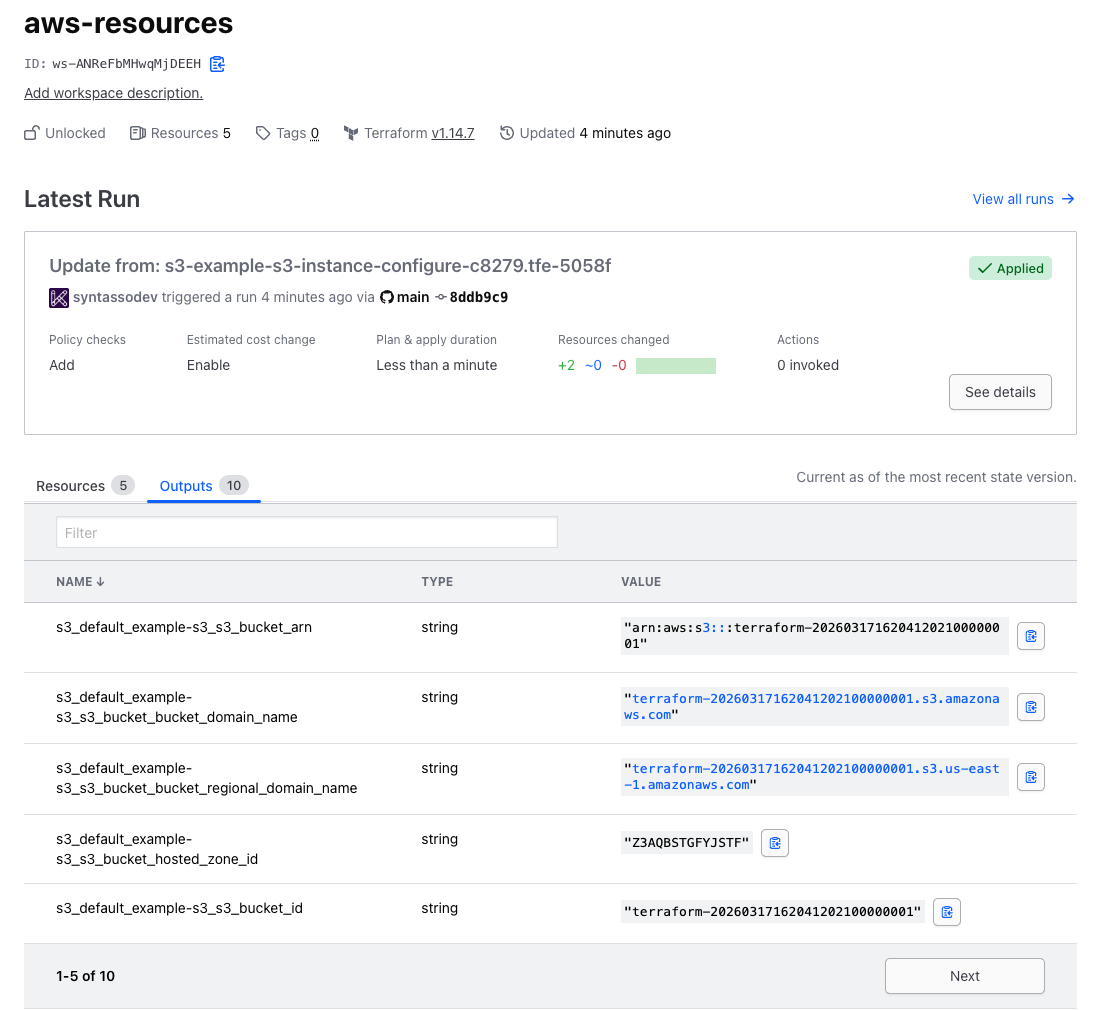
And now, let's look at the Resource Request itself:
kubectl describe s3 example-s3
You should see that the status of the request now mirrors the outputs we saw in the Terraform Cloud UI:
  Last Successful Configure Workflow Time:  2026-01-14T12:06:26Z
  Message:                                  Resource requested
  Observed Generation:                      1
  Outputs:
    Tfe:
      s3_default_example-s3_s3_bucket_arn:                            arn:aws:s3:::terraform-20260317162041202100000001
      s3_default_example-s3_s3_bucket_bucket_domain_name:             terraform-20260317162041202100000001.s3.amazonaws.com
      s3_default_example-s3_s3_bucket_bucket_regional_domain_name:    terraform-20260317162041202100000001.s3.us-east-1.amazonaws.com
      s3_default_example-s3_s3_bucket_hosted_zone_id:                 Z3AQBSTGFYJSTF
      s3_default_example-s3_s3_bucket_id:                             terraform-20260317162041202100000001
      s3_default_example-s3_s3_bucket_lifecycle_configuration_rules:
      s3_default_example-s3_s3_bucket_policy:
      s3_default_example-s3_s3_bucket_region:                         us-east-1
      s3_default_example-s3_s3_bucket_website_domain:
      s3_default_example-s3_s3_bucket_website_endpoint:
  Workflows:                                  2
  Workflows Failed:                           0
  Workflows Succeeded:                        2
🎉 Congratulations
✅ You have successfully created a Promise from a Terraform module! It can create infrastructure based on inputs from requests, produce outputs and surface these to users in the status of the request.
