Kratix and Terraform
Terraform is a tool for writing infrastructure as code. It is used to define both cloud and on-prem resources in human-readable configuration files that you can version, reuse, and share.
What
Terraform and Kratix both aim to enable infrastructure as code (IaC) but at different abstraction levels.
Terraform has a mature community that supports managing cloud and other SaaS tooling through their custom HCL programming language. Using HCL, platform teams are able to create, modify, and delete infrastructure in a declarative way.
Kratix enables platform teams to create Promises. Promises define an API for their users (application engineers) to easily request on-demand Resources. Promises also define what happens when a Resource is requested: validating business rules, generating Terraform or other IaC, deciding where it should be applied, and any additional steps like releasing software that runs on the provisioned infrastructure.
Why
IaC has historically been implemented, and used, almost exclusively by platform and other infrastructure facing teams.
Today, there is a larger focus on making this infrastructure self-service by end users like application engineers. Think Databases-as-a-Service or test environments-as-a-Service. While IaC may be the implementation of how to fulfil these requests, it is not always clear to an end user how to leverage a module to create a new resource so it often requires a ticket for the infrastructure team to complete. This creates blocking queues for end users and increased toil for infrastructure and platform teams.
To provide on-demand services, a platform team is best suited decoupling their API for requesting a service from the implementation for how to create and manage them.
How
Kratix enables platform teams to declare APIs that orchestrate workloads across your infrastructure. When that infrastructure is managed with Terraform, a Promise turns each request into Terraform configuration, and something then has to apply it. There are three ways to do this:
We recommend a dedicated Terraform engine for most platforms. Kratix is not a Terraform runner. Tools built to run Terraform already handle state, locking, retries and drift, so Kratix can focus on the API, the business rules and sending the configuration to the right place.
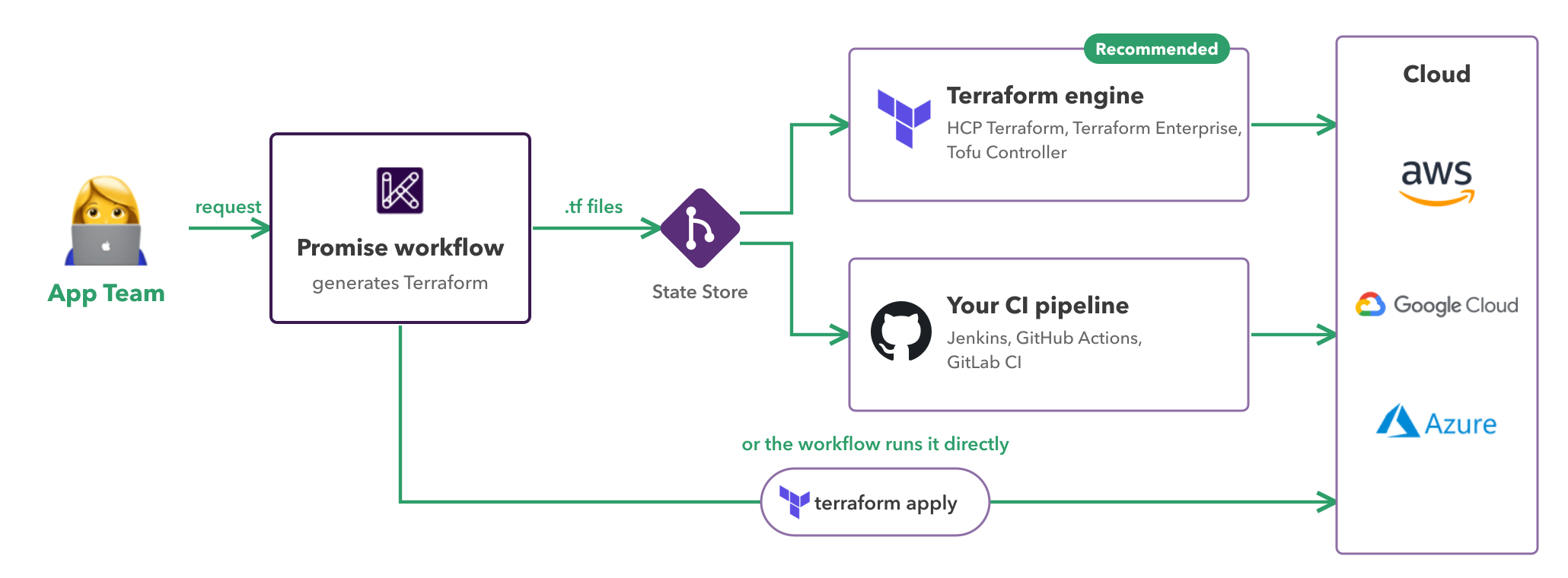
Using a Terraform engine
The Promise workflow generates Terraform files. Kratix schedules them to a Destination, which writes them to a State Store. A Terraform engine watches that State Store and applies the changes. The engine can be an HCP Terraform or Terraform Enterprise workspace that watches a Git repository, or a Kubernetes controller on the Destination cluster, such as the Tofu Controller or the HCP Terraform Operator.
Use a Terraform engine when:
- you already use one, or plan to
- you want state, locking, plans and drift detection handled outside Kratix
- you want every change to go through Git, where you can review and audit it
The Promise workflow finishes once the files are written, and the apply happens later in the engine. This means plan and apply errors show in the engine, not in the Resource status. To bring Terraform outputs back into the Resource status, SKE provides the Terraform State Finder stage.
The Kratix CLI generates Promises that work this way. kratix init tf-module-promise creates a Promise from a Terraform module. Its workflow writes a .tf file for each request and schedules it to Destinations labelled environment: terraform. It does not run Terraform itself. To see this end to end with SKE, read Terraform Enterprise and HCP Terraform, Creating a Promise from a Terraform Module and Scheduling to different Terraform Workspaces.
Running Terraform in the Promise workflow
A container in the Promise workflow can run terraform init and terraform apply directly, with no separate Terraform engine.
Run Terraform in the workflow when:
- the infrastructure is simple and you want the result within the same workflow run
- you have no Terraform engine or pipeline to hand the work to
- you are trying Kratix out or building a demo
The trade-off is that you own everything an engine would do for you: storing and locking state, and keeping credentials available to the workflow. Kratix runs the workflow again on updates and on periodic reconciliation, and every run calls terraform apply, so your Terraform must be safe to apply many times. To remove the infrastructure when a Resource is deleted, add a delete workflow that runs terraform destroy.
The Kratix workshop works this way. It creates a bucket and stores the Terraform state in a ConfigMap.
Using your existing pipelines
The Promise workflow generates Terraform files and Kratix writes them to a Git State Store, in the same way as with a Terraform engine. Your CI pipeline (for example Jenkins, GitHub Actions or GitLab CI) then runs on each commit to that repository and runs terraform plan and terraform apply.
Use your existing pipelines when:
- your organisation already has approved Terraform pipelines, with their own policy checks and approvals
- you want to put a self-service API in front of those pipelines without replacing them
Kratix does not see the pipeline result. A Promise generated with kratix init tf-module-promise also works here: point your pipeline at the repository the Destination writes to.
If you'd like information from your external pipelines to show up in your Resource requests, you can implement health checks. See Surfacing health information.
If this sounds interesting to you, contact us and we can help you get started with Kratix and Terraform.
