Intro: Kratix and Promises
This is part of a series illustrating how to write Kratix Promises.
👉🏾 Next: Writing your first Promise
In this tutorial, you will
Prerequisites
To complete this workshop, you will need to have access to an installation of Kratix as well as some essential tools. Take a look at the Prerequisites to ensure your environment is correctly configured.
What is Kratix?
Kratix is a framework that enables co-creation of capabilities by providing a clear contract between application and platform teams through the definition and creation of "Promises". Kratix focuses on empowering platform engineers to build better platforms. The following video provides a high-level overview of Kratix:
For a more in-depth explanation of Kratix, check the introduction to Kratix doc.
What is a Promise?
Kratix Promises are the encapsulation of platform offerings. They provide a structure to manage the complexities of providing something-as-a-service, including the definition of how a user can request a Resource, the steps to provision the requested Resource, and how to provide access to the Resource.
Promises allow platform teams to:
- Define an API, including versioning and validation
- Execute imperative commands per the user request
- Use GitOps to continuously reconcile delivered services
- Install and configure (or verify) dependencies for delivering a service
- Manage where services are deployed across the infrastructure (on and off-Kubernetes, on Cloud providers, etc)
Promise Architecture
Before jumping into writing a Promise, here is a quick review of the Promise Architecture.
At a very high-level, a Promise is made up of four parts:
- The Promise API: The Promise API is what the users of the Platform will interact with when requesting a new Resource from the Promised Service
- The Imperative Workflow: A series of steps where Platform teams can codify all of their business requirements.
- The Declarative State: The Workflow executes a series of imperative steps to generate a declarative state that is then persisted to the State Store. Other systems will then converge on that state.
- The Dependencies: A dependency is anything that must be installed or made available on Destinations to enable the promised service to run.
As you go through building your own Promise, you will explore each of these four sections in detail.
The Promise
As part of this workshop, you are going to create a Promise that delivers Apps as a Service. It will bundle the Kubernetes resources needed to run an application, namely a Deployment, Service, and Ingress. As a dependency, it will include the NGINX Ingress controller.
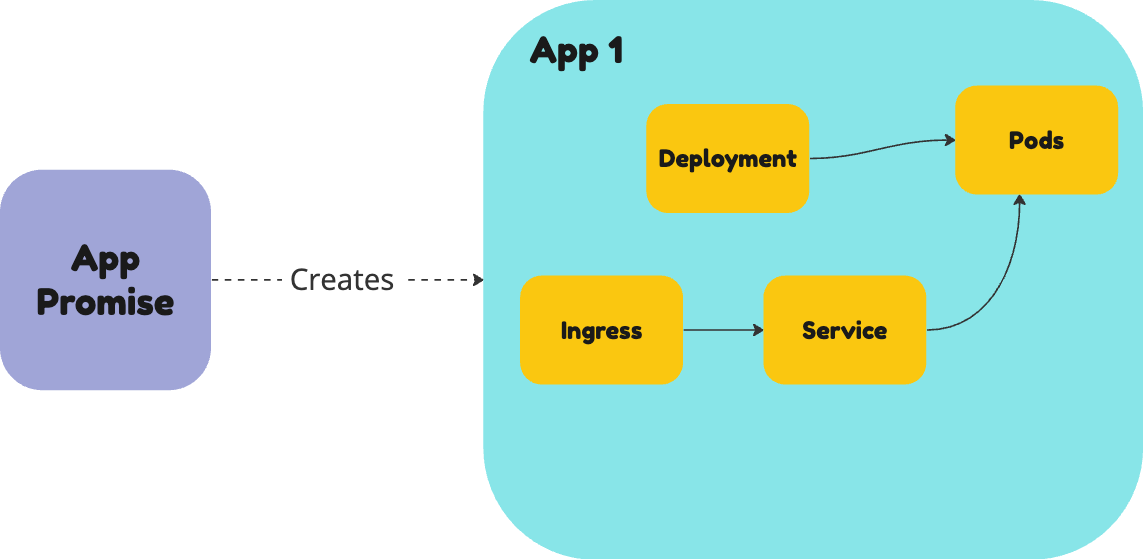
In this introduction, you will install and request an application from this Promise, to see how it would work in action. In the next sections, you will go through the steps to build it yourself from scratch.
Install the Promise
To install the App as a Service Promise, run the following command:
kubectl --context $PLATFORM apply --filename https://raw.githubusercontent.com/syntasso/kratix-docs/refs/heads/main/assets/workshop-app-promise/promise.yaml
As part of the Promise Configure Workflow, the Promise will install the NGINX Ingress Controller in the worker Destination. You can check that it got installed by running the following command:
kubectl --context $WORKER get deployments --namespace ingress-nginx
It may take a couple of minutes, but you will eventually see an output similar to:
NAME                       READY   UP-TO-DATE   AVAILABLE   AGE
ingress-nginx-controller   1/1     1            1           2m8s
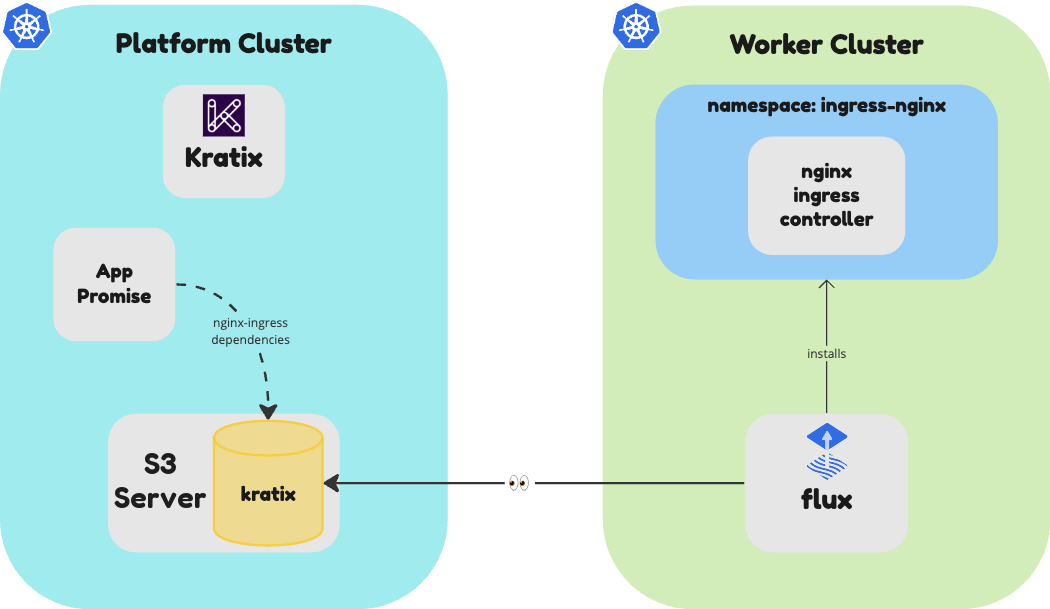
Confused about what's going on? Don't panic!
In the next section you will go through each part of this Promise in depth. You can also go through Part I: Installing a Promise for more details.
Using the App Promise
You can switch hats now and assume the role of an App developer trying to deploy their application.
As a developer, you can check the available Promises by running the following ommand:
kubectl --context $PLATFORM get promises
The above command should output the following:
NAME   STATUS      KIND   API VERSION             VERSION
app    Available   App    workshop.kratix.io/v1   v1.0.0
You can see that the app Promise is available. Great! You can deploy your app
by providing an image and a service.port, as defined by the Promise API.
To deploy a new application, run the following command:
cat << EOF | kubectl --context $PLATFORM apply -f -
apiVersion: workshop.kratix.io/v1
kind: App
metadata:
  name: todo
  namespace: default
spec:
  image: syntasso/sample-todo:v0.1.0
  service:
    port: 8080
EOF
Kratix will receive the request and execute the workflow defined in the Promise. You can verify the workflow by running the following command:
kubectl --context $PLATFORM get pods
The above command should output something similar to:
NAME                                               READY   STATUS      RESTARTS      AGE
kratix-app-todo-resource-configure-029c3-5tmbq     0/1     Completed   0             1m
It may take a few seconds for the pod to appear, but it will eventually show as Completed. At this stage, Kratix will schedule the workflow outputs to the Worker cluster. You should see the App getting deployed on the Worker with the following command:
kubectl --context $WORKER get deployments
The above command should output something similar to (it may take a couple of minutes):
NAME   READY   UP-TO-DATE   AVAILABLE   AGE
todo   1/1     1            1           16s
Once the deployment is completed, you can access the App in your browser, at http://todo.local.gd:31338.
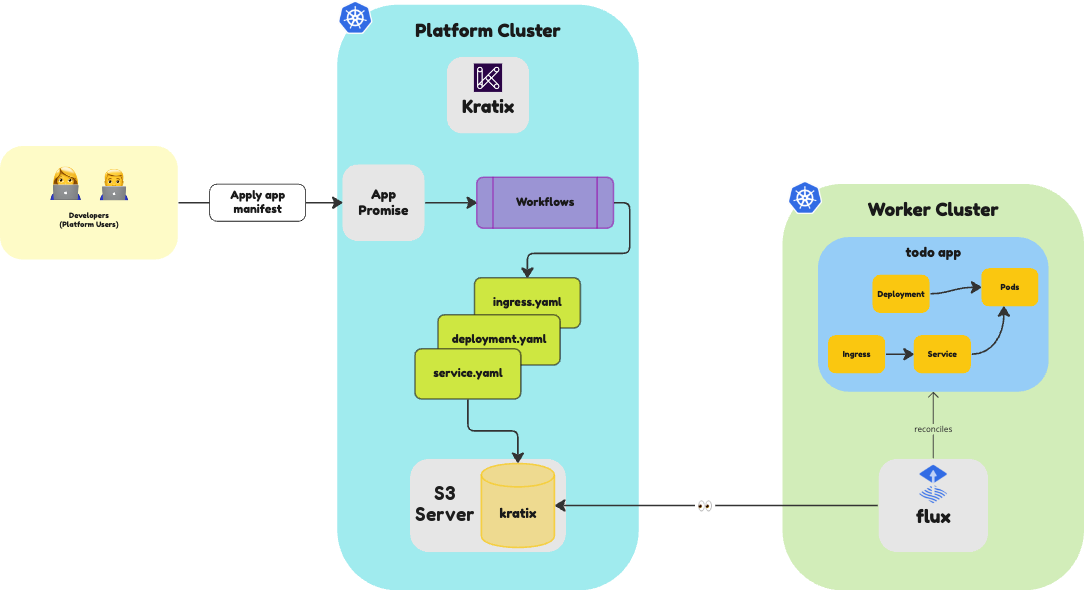
Cleaning up
In the next sections, you will write this Promise from scratch. To ensure you have a clean state before it, go ahead and delete the Promise.
kubectl --context $PLATFORM delete promises --all
🎉 Congratulations!
You just installed and use a Promise. Well done!
👉🏾 Next, let's write this promise.
